
Subaru Crosstrek Service Manual: Preparation tool
VEHICLE DYNAMICS CONTROL (VDC) (DIAGNOSTICS) > General Description
PREPARATION TOOL
1. SPECIAL TOOL
ILLUSTRATION | TOOL NUMBER | DESCRIPTION | REMARKS |
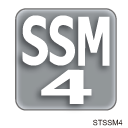
—
SUBARU SELECT MONITOR 4
Used for setting of each function and troubleshooting for electrical system.
NOTE:
For detailed operation procedures of Subaru Select Monitor 4, refer to “Application help”.
2. GENERAL TOOL
TOOL NAME | REMARKS |
Circuit tester | Used for measuring resistance, voltage and current. |
Oscilloscope | Used for measuring the sensor. |
DST-i | Used together with Subaru Select Monitor 4. |
 Caution
VEHICLE DYNAMICS CONTROL (VDC) (DIAGNOSTICS) > General DescriptionCAUTION1. SUPPLEMENTAL RESTRAINT SYSTEM “AIRBAG”Airbag system wiring harness is routed near the ABS wheel speed sensor ...
 Inspection
VEHICLE DYNAMICS CONTROL (VDC) (DIAGNOSTICS) > General DescriptionINSPECTIONBefore performing diagnosis, check the following items which might affect VDC problems.1. BATTERYCheck the battery. Batt ...
Other materials:
Installation
EXTERIOR/INTERIOR TRIM > Front BumperINSTALLATION1. Install each part in the reverse order of removal.2. Secure the flange section of the bumper face - front to the bracket - front bumper side.CAUTION:• Install so that the front end of the under cover (b) comes inside the bumper face - fron ...
Removal
EXTERIOR BODY PANELS > Rear DoorREMOVAL1. REAR DOOR PANEL1. Disconnect the ground cable from battery. NOTE">2. Remove the trim panel - rear door. Door Trim > REMOVAL">3. Remove the sealing cover - rear door. Rear Sealing Cover > REMOVAL">4. Remove the cover B pill ...
Dtc b2815 power supply high voltage
EyeSight (DIAGNOSTICS) > Diagnostic Procedure with Diagnostic Trouble Code (DTC)DTC B2815 POWER SUPPLY HIGH VOLTAGEDetected when the status for the battery voltage of 16 V or more continues approximately for 5 seconds and is judged to be abnormally high voltage.Refer to DTC B2814 for DTC detectin ...
