
Subaru Crosstrek Owners Manual: Preparation for date setting
- Turn the ignition switch to the "ON" position.
- Push and hold the button to show the selection screen.
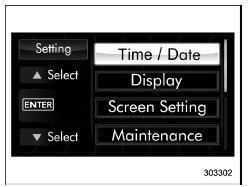
- After the selection screen is displayed,
operate the "
 "
or "
"
or "
 " switch to show the
"Time/Date" item. Then, push the
button.
" switch to show the
"Time/Date" item. Then, push the
button.
 Date and time settings
The items in the date and time settings
can be set. To change the items, operate
the "
" or "
" switch.
NOTE
The "Time/Date" item must be set to
display the "Birthday", "Anniversary"
...
 Current date and time setting
1. Perform the preparation steps according
to "Preparation for date setting" 3-
56.
2. Operate the "
" or "
" switch to
select the "Time/Date" item. Then push
the
button.
...
Other materials:
Rear tie-down holes
Rear tie-down hole
The rear tie-down holes are located near
each of the jack-up reinforcements.
There is a plug in each rear tie-down hole.
To use the rear tie-down holes, remove
the plugs. After using the rear tie-down
holes, return the plugs to their original
places.
WARNING
...
Light control and wiper control levers/switches
The Subaru Ascent provides intuitive control over lighting and wiper systems,
ensuring optimal visibility in all driving conditions, from heavy rain to nighttime
travel.
Windshield wiper
Mist
Windshield washer
Rear window wiper and washer switch
Wiper intermittent time control ...
Dtc p2401 evap system leak detection pump control circuit low
ENGINE (DIAGNOSTICS)(H4DO) > Diagnostic Procedure with Diagnostic Trouble Code (DTC)DTC P2401 EVAP SYSTEM LEAK DETECTION PUMP CONTROL CIRCUIT LOWDTC detecting condition:Immediately at fault recognitionCAUTION:After servicing or replacing faulty parts, perform Clear Memory Mode Clear Memory Mode ...
