
Subaru Crosstrek Owners Manual: Power window operation by passengers
Passenger's side power window switches
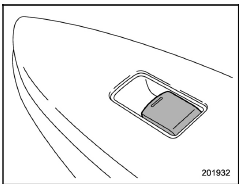
Each passenger window can be controlled by the power window switch located on the door.
Operating the windows
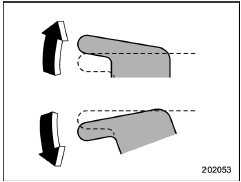
To open: Press the switch down and hold it until the window reaches the desired position.
To close: Pull the switch up and hold it until the window reaches the desired position.
When the lock switch on the power window switch cluster, located on the driver's side door, is in the lock position, the passengers' windows cannot be operated with the passengers' switches.
 Locking the passengers' windows
Lock
Unlock
To lock:
Press the lock switch. When the lock
switch is in the lock position, the passengers'
windows cannot be opened or
closed.
To unlock:
Press the lock switch again ...
 Initialization of power window
If the vehicle's battery is disconnected due
to situations such as battery or fuse
replacement, the following functions are
deactivated.
One-touch auto up/down function
Anti-entrapment functi ...
Other materials:
Ignition switch (models without "keyless access with push-button start system")
WARNING
Never rotate the ignition switch of your Subaru Ascent to the "LOCK"
position while the vehicle is in motion or being towed, as this will lock the
steering wheel and result in complete loss of steering control. Additionally,
once the engine is turned off, significantly ...
Keyless access with push-button start system
The Subaru Ascent may also be equipped with an advanced keyless access system
featuring push-button start, enhancing both convenience and security.
Access key fob (main)
Access key fob (sub)
Key number plate
The Subaru Ascent keyless access system enables the following functions whe ...
Engine oil setting
1. Perform the preparation steps according
to "Preparation for maintenance settings"
2. Operate the "
" or "
" switch to
select the "Engine Oil" item. Then push
the
button.
3. Select the setting location (month, day,
year or distance) by operating the "
" or ...
