
Subaru Ascent 2018-2026 Owner's Manual: Power driver's seat with synchronized outside mirrors memory function
This advanced feature in the Subaru Ascent allows drivers to store and recall personalized seating and mirror configurations, significantly improving comfort and convenience. The memory system in the Subaru Ascent ensures that your preferred driving position is restored instantly, making daily driving more efficient and ergonomic.
WARNING
- To prevent loss of control or potential injury while operating the Subaru
Ascent, never attempt to perform the following actions while driving.
- Adjusting the driver's seat
- Selecting or activating a stored seat memory position
- Before adjusting the seat or recalling a stored position in the Subaru Ascent, always ensure that no cargo, objects, or body parts of rear passengers are obstructing the seat adjustment mechanism.
- When using the memory seat adjustment function in the Subaru Ascent, confirm that the gear selector is in the "P" (Park) position and that the parking brake is fully engaged. Do not begin driving until all seat adjustments are completed.
- If any abnormal operation or malfunction occurs during seat memory adjustment
in the Subaru Ascent, immediately stop the process by performing one of the
following actions.
- Operate any power seat adjustment switch.
- Press the "SET" button.
- Press memory button "1" or "2".
- Operate the outside mirror adjustment switch.
In the Subaru Ascent, you can conveniently register seat positions using memory buttons "1" or "2", as well as through individual key fobs for multiple drivers.
The Subaru Ascent memory system allows storage of the following settings for a fully customized driving experience:
- Forward and backward seat position
- Seatback reclining angle
- Seat cushion tilt angle
- Seat height adjustment
- Outside mirror angles
- Passenger-side mirror tilt angle when reverse tilt-down function is activated
NOTE
In the Subaru Ascent, seat memory positions can also be linked with Driver Monitoring System profiles. To enable this feature, complete user registration within the Driver Monitoring System settings menu.
Registration of memory position with button "1" or "2"
1. Adjust the seat and outside mirror positions in the Subaru Ascent under the following required conditions.
- The parking brake is applied.
- The ignition switch is in the "ON" position.
- The select lever is set to the "P" position.
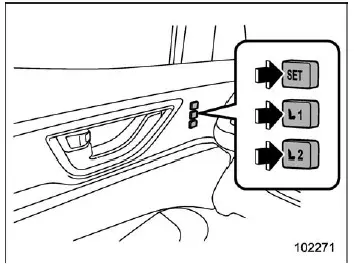
2. Save the adjusted seat and mirror positions in the Subaru Ascent using one of the following methods.
- Press the "SET" button, then press either "1" or "2" within 5 seconds until a confirmation chime is heard.
- Press and hold the "SET" button while simultaneously pressing "1" or "2" until a chime sounds within 5 seconds.
Once the Subaru Ascent emits a confirmation chime, the seat position and passenger-side mirror angle are successfully stored in memory.
NOTE
If a new position is saved using the same memory button in the Subaru Ascent, the previously stored configuration will be automatically overwritten.
Registration of the reverse tilt-down mirror angle with button "1" or "2"
CAUTION
When setting the reverse tilt-down mirror angle in the Subaru Ascent, always press and hold the brake pedal to ensure safe operation during the adjustment process.
1. Move the gear selector to the "R" (Reverse) position. The passenger-side mirror in the Subaru Ascent will automatically tilt downward to improve rear visibility.
2. Adjust the passenger-side mirror angle to your preferred position. For detailed adjustment procedures, refer to the remote control mirror switch section.
3. Return the gear selector to the "P" (Park) position. The mirror will automatically return to its original position.
4. Store the adjusted mirror angle using one of the following methods.
- Press the "SET" button, then press either "1" or "2" until a confirmation chime sounds within 5 seconds.
- Press and hold the "SET" button while pressing "1" or "2" until a chime sounds within 5 seconds.
The Subaru Ascent memory seat system enhances everyday usability by allowing multiple drivers to quickly restore their preferred seating and mirror configurations, improving both comfort and driving safety.
When the Subaru Ascent successfully saves the selected configuration, a single confirmation chime will be heard. This indicates that both the seat position and the passenger-side outside mirror angle have been accurately registered in the system memory.
NOTE
- In the Subaru Ascent, the outside mirror will automatically return to its original position approximately 9 seconds after the select lever is moved out of the "R" (Reverse) position.
- By default, this function operates for the front passenger-side mirror
in the Subaru Ascent. However, the system can be reconfigured to control the
driver's side mirror instead by an authorized SUBARU dealer.
For advanced configuration or customization, it is recommended to contact your SUBARU dealer for detailed assistance.
Registration of memory position with an access key fob (if equipped)
1. To register a personalized memory position in the Subaru Ascent using the access key fob, first ensure that all necessary conditions are met.
- The parking brake is securely applied.
- The ignition switch is set to the "LOCK"/"OFF" position.
- The select lever is positioned in "P" (Park).
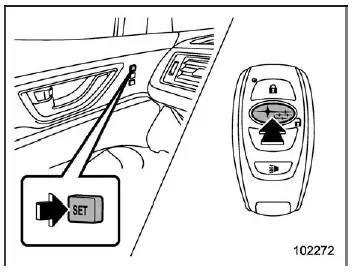
2. Hold the access key fob and press and hold the "SET" button. Then press the
"
 "
button on the key fob.
"
button on the key fob.
Once completed, the Subaru Ascent will emit a confirmation chime, indicating that the selected memory position has been successfully stored.
NOTE
While registering seat memory in the Subaru Ascent, ensure that you are carrying only the specific access key you intend to register. If multiple key fobs are present, the system may not correctly identify the intended device, preventing successful registration.
Registration of the reverse tilt-down mirror angle with the key fob
CAUTION
When configuring the reverse tilt-down mirror function in the Subaru Ascent, always press and hold the brake pedal to ensure stability and safety during the setup process.
1. Shift the select lever to the "R" (Reverse) position. The passenger-side mirror in the Subaru Ascent will automatically tilt downward to enhance visibility when reversing.
2. Adjust the outside mirror angle to your desired viewing position. For additional details, refer to the "Remote control mirror switch" section.
3. Move the select lever back to the "P" (Park) position. The mirror will return to its original position.
4. Turn the ignition switch to the "OFF"/"LOCK" position.
5. Hold the access key fob and press and hold the "SET" button, then press the
"
 "
button on the key fob.
"
button on the key fob.
A confirmation chime will sound once, indicating that the reverse tilt-down mirror angle has been stored successfully in the Subaru Ascent system.
NOTE
- The outside mirror in the Subaru Ascent will return to its original position approximately 9 seconds after shifting out of the "R" position.
- The default setting is configured for the passenger-side mirror. Adjustment
of the driver's side mirror functionality can be performed by a SUBARU dealer.
Consult your SUBARU dealer for detailed configuration options and system customization.
- The Subaru Ascent temporarily stores the adjusted mirror angle for approximately 45 seconds after the ignition is turned to the "OFF" position. Ensure that you complete the registration within this time frame while the memory function remains active.
Utilizing of memory position registered with button "1" or "2"
WARNING
When recalling a stored seating position in the Subaru Ascent, always ensure that you press the correct memory button. Selecting an incorrect position may result in an improper driving posture, which can negatively affect vehicle control and reduce the effectiveness of the seatbelt system.
For optimal comfort and safety in the Subaru Ascent, it is recommended to verify your seating and mirror positions after recall. Proper alignment ensures better visibility, improved ergonomics, and enhanced overall driving confidence.
Failure to follow these instructions in the Subaru Ascent may result in a dangerous situation, potentially leading to an accident involving serious injury or even loss of life.
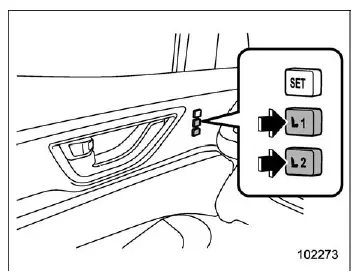
- Turn the ignition switch of the Subaru Ascent to the "ON" position to activate the electrical systems.
- Ensure the select lever is placed in the "P" (Park) position and apply the parking brake. Then press memory button "1" or "2" to recall the stored driving position.
After pressing the button, the Subaru Ascent will emit a confirmation chime, and both the seat and outside mirrors will automatically adjust to the previously saved position, providing immediate comfort and optimal driving ergonomics.
When the select lever of the Subaru Ascent is shifted to the "R" (Reverse) position, the outside mirror will automatically tilt downward to the registered reverse tilt-down angle, improving visibility during parking and reversing maneuvers.
NOTE
- In the Subaru Ascent, disconnecting or removing the vehicle battery will not erase the stored memory seat positions, ensuring long-term data retention.
- If memory buttons "1" or "2" are pressed within approximately 45 seconds after opening the driver's door, the Subaru Ascent can recall the stored seat position even when the ignition switch is in the "LOCK" or "OFF" position.
- Pressing both memory buttons "1" and "2" simultaneously in the Subaru Ascent may prevent the system from executing the seat position recall function.
- If the current seat position already matches the stored configuration, the Subaru Ascent will emit two chirps to indicate no adjustment is necessary.
Utilizing of the seat position registered with access key fob
1. Hold the registered access key fob associated with your Subaru Ascent.
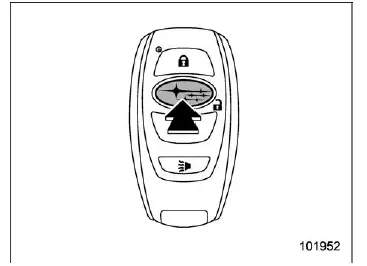
2. Unlock the driver's door by pressing the "
 "
button or by gripping the door handle using the keyless access system.
"
button or by gripping the door handle using the keyless access system.
3. Open the driver's door.
Once the door is opened, the Subaru Ascent will emit a confirmation sound and automatically move the seat to the stored memory position, ensuring a personalized driving setup.
When the select lever is shifted to "R", the Subaru Ascent will also activate the reverse tilt-down mirror function based on the stored settings.
NOTE
- If the Subaru Ascent does not retrieve the stored seat position after
following the steps above, try the following procedure.
- Press the "SET" button located on the driver's door panel.
- Press the "
 "
button on the access key fob or touch the door lock sensor to lock the vehicle.
"
button on the access key fob or touch the door lock sensor to lock the vehicle. - Repeat the retrieval procedure again.
- If the keyless access system in the Subaru Ascent is disabled, seat
memory recall will not activate when gripping the door handle. However, it can
still be triggered by pressing the "
 "
button on the key fob.
"
button on the key fob. - Registering a new seat position with the same key fob in the Subaru Ascent will overwrite the previously stored memory position.
- If multiple key fobs are present near the Subaru Ascent, the system may not correctly identify the intended key, which can prevent memory recall from functioning properly.
Clearing the registered seat position with access key fob
1. Close the driver's door of the Subaru Ascent completely.
2. While holding the access key fob and pressing the "SET" button, press the
"
 "
button on the key fob.
"
button on the key fob.
A confirmation chime will sound, indicating that the stored seat memory position in the Subaru Ascent has been successfully cleared.
NOTE
After deleting a stored seat position in the Subaru Ascent, wait a few seconds before registering a new position to ensure proper system operation and accurate memory storage.
The intelligent memory system in the Subaru Ascent enhances daily usability by automatically adapting the vehicle to each driver, improving comfort, convenience, and overall driving experience.
 Power seat
Driver's seat
Seat position forward/backward control switch
In the Subaru Ascent, move the control switch forward or backward to
adjust the seat position. During this adjustment, the ...
 Second-row seats
The Subaru Ascent second-row seating system is designed to deliver exceptional
comfort, flexibility, and safety for passengers. Whether equipped with captain seats
or a bench configuration, th ...
Other materials:
Dtc c1232 rear right abs sensor signal
VEHICLE DYNAMICS CONTROL (VDC) (DIAGNOSTICS) > Diagnostic Procedure with Diagnostic Trouble Code (DTC)DTC C1232 REAR RIGHT ABS SENSOR SIGNALNOTE:For the diagnostic procedure, refer to “DTC C1242 REAR LEFT ABS SENSOR SIGNAL”. Diagnostic Procedure with Diagnostic Trouble Code (DTC) > ...
Reverse Automatic Braking (RAB) system ON/OFF setting
In the Subaru Ascent, when the select lever is moved into the "R" (Reverse) position,
you gain access to customizable settings for the Reverse Automatic Braking (RAB)
system directly through the center information display. This allows the driver to
conveniently enable or disable key ...
Installation
SECURITY AND LOCKS > Remote OpenersINSTALLATION1. Before installation, check the following items.• Cable is free from deformation such as fray.2. Install each part in the reverse order of removal.Tightening torque:Front hood lock: General Description > COMPONENT">Remote opener: ...
