
Subaru Ascent 2018-2026 Owner's Manual: Main screen
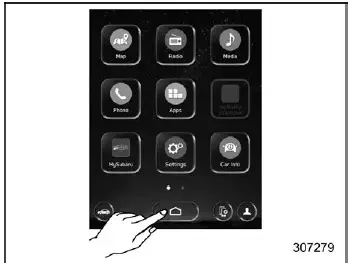
To access the main screen in the Subaru Ascent, simply touch
 (HOME). This action instantly brings up the central interface, where all primary
vehicle systems and settings are organized for quick and intuitive access.
(HOME). This action instantly brings up the central interface, where all primary
vehicle systems and settings are organized for quick and intuitive access.
Within this Owner's Manual, only selected configuration sections are described in detail. For comprehensive guidance on additional features and functions of the Subaru Ascent infotainment system, refer to the separate navigation/audio Owner’s Manual.
- "Settings"
 "General"
 - "Settings"
 "Car"
"Car" - "Car Info"
General settings
The General settings menu in the Subaru Ascent allows you to configure system-wide parameters such as time, display preferences, and other essential interface options to match your personal driving style and regional requirements.
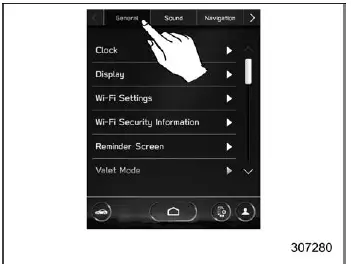
- Touch
 (HOME).
 -

 (Settings)
 -
 "General"
 - Select the preferred menu.
The Subaru Ascent enables manual customization of multiple parameters within the General settings section, allowing drivers to fine-tune display behavior and system preferences according to their individual needs.
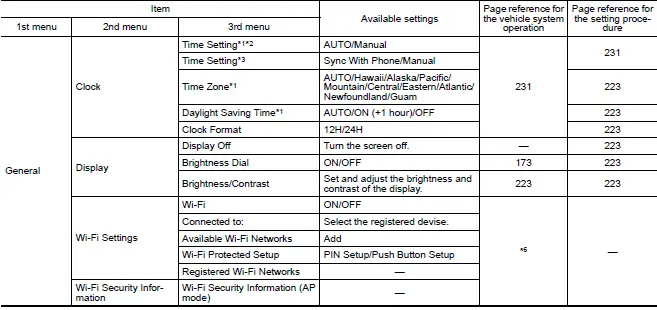
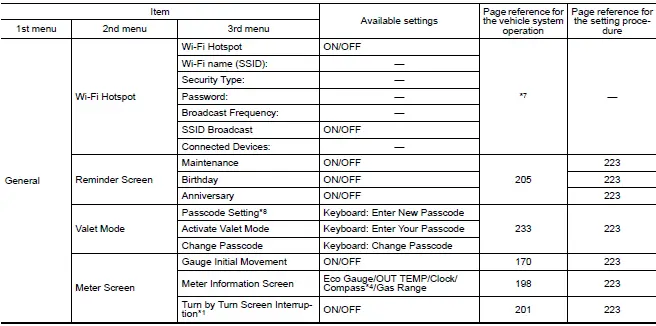
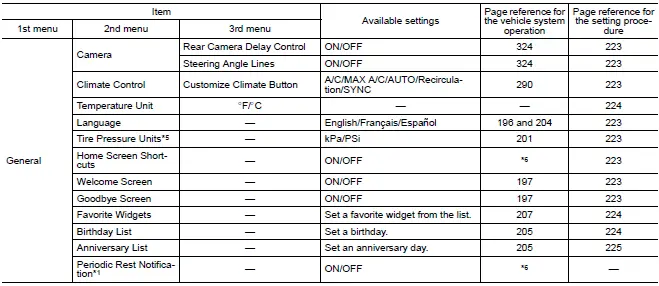
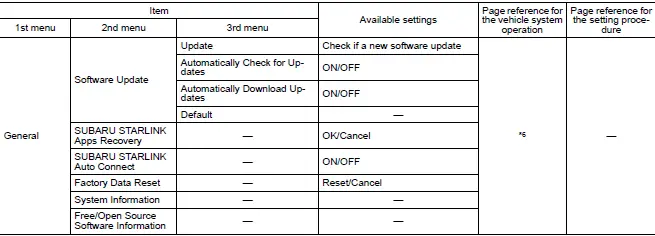
*1: Models with navigation system
*2: Models with SUBARU STARLINK without navigation system
*3: Models without SUBARU STARLINK or navigation system
*4: Models without navigation system
*5: If equipped
*6: For details about the audio and navigation system, refer to the Owner's Manual
supplement for the audio and navigation system.
*7: For details, refer to the Owner's Manual supplement for SUBARU STARLINK Safety
and Security.
*8: Displayed until valet mode is set.
NOTE
Touch
 to display detailed explanations of each configurable item.
Car settings
The Car settings menu in the Subaru Ascent is dedicated to configuring vehicle-specific systems, including safety features such as the EyeSight system, as well as various operational parameters tailored to the vehicle’s performance and behavior.
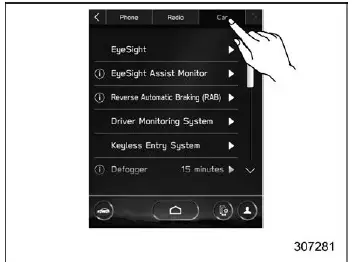
- Touch
 (HOME).
 -

 (Settings)
 -
 "Car"
"Car" - Select the preferred menu.
The Subaru Ascent allows drivers to personalize a wide range of vehicle settings within this section, adapting system behavior to individual driving preferences and enhancing overall comfort and control.
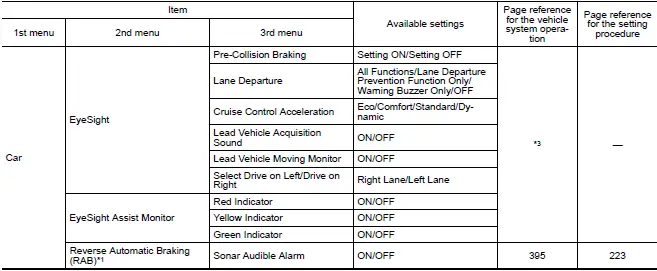
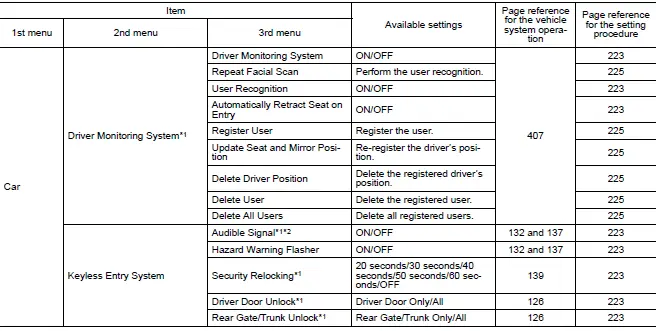
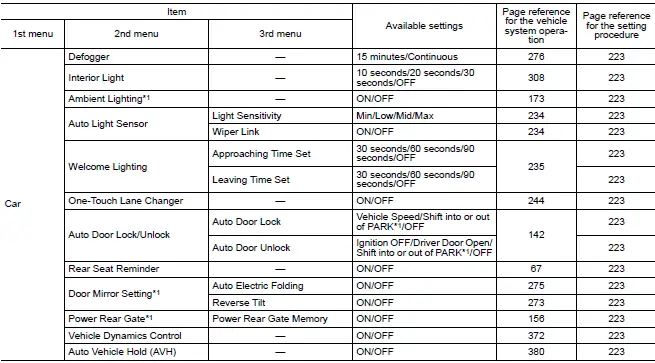
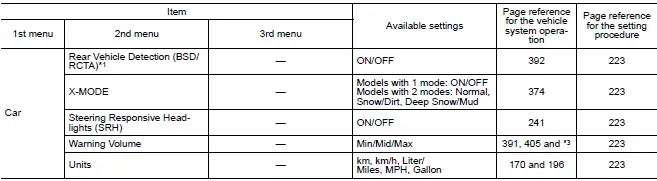
*1: If equipped
*2: This setting also works as the On/Off setting of the power rear gate buzzer
for starting operation.
However, you cannot change the warning buzzer setting for a detecting jam, etc.
*3: For details about EyeSight system, refer to the Owner's Manual supplement for
the EyeSight system.
NOTE
Touch
 to view explanations and detailed descriptions of each setting.
The Subaru Ascent main screen is engineered to deliver a balanced combination of accessibility and depth, allowing drivers to quickly reach essential controls while still offering advanced customization for a more personalized driving experience.
 Display
Touch screen
HOME icon
Status bar
Information bar
Main screen
Driver profiles icon
Manage device icon
Climate control screen
Car settings icon
In the Subaru Ascent, the adv ...
 How to select items on the screen
ON/OFF setting
Example
Within the Subaru Ascent interface, settings can be easily enabled or disabled
by touching the corresponding option and selecting ON
or OFF
.
This intuitive toggl ...
Other materials:
Installation
CONTROL SYSTEMS > Select LeverINSTALLATION1. Set the select lever assembly to the vehicle body.2. Tighten the four mounting bolts to attach the select lever assembly to the vehicle body.Tightening torque:18 N·m (1.8 kgf-m, 13.3 ft-lb)3. Connect the harness connector.4. Install the harness ...
Dtc p014c a/f / o2 sensor slow response - rich to lean bank 1 sensor 1
ENGINE (DIAGNOSTICS)(H4DO) > Diagnostic Procedure with Diagnostic Trouble Code (DTC)DTC P014C A/F / O2 SENSOR SLOW RESPONSE - RICH TO LEAN BANK 1 SENSOR 1DTC DETECTING CONDITION:Detected when two consecutive driving cycles with fault occur.CAUTION:After servicing or replacing faulty parts, perfor ...
Dtc b1507 external air temperature open/short-circuit detection
INSTRUMENTATION/DRIVER INFO (DIAGNOSTICS) > Diagnostic Procedure with Diagnostic Trouble Code (DTC)DTC B1507 EXTERNAL AIR TEMPERATURE OPEN/SHORT-CIRCUIT DETECTIONDTC detecting condition:Open or short circuit in ambient sensorTrouble symptom:• Defective ambient temperature display• Def ...
