
Subaru Ascent 2018-2026 Owner's Manual: Locking and unlocking from the outside
NOTE
If you unlock the driver's door of your Subaru Ascent using a key (including the emergency key) while the alarm system is armed, opening the door will trigger the alarm, causing the vehicle horn to sound. To stop the alarm in the Subaru Ascent, perform one of the following actions:
- Models with "keyless access with push-button start system":
- Press any button on the Subaru Ascent access key fob (if the battery is not discharged).
- Press the push-button ignition switch to the "ACC" position.
- Carry the Subaru Ascent access key fob and perform one of the following:
- Grip the front door handle.
- Press the rear gate opener button.
- Models without "keyless access with push-button start system":
- Press any button on the remote transmitter.
- Insert the key into the ignition and turn it to the "ON" position.
How to lock and unlock the vehicle using the key
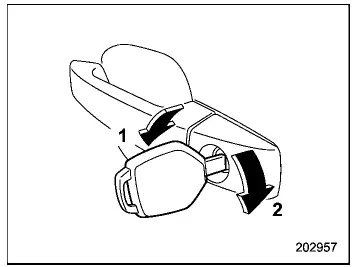
- Turn the key toward the front of the Subaru Ascent to lock the door.
- Turn the key toward the rear to unlock the door.
Using this method, only the driver’s door of the Subaru Ascent will be locked or unlocked.
NOTE
For Subaru Ascent models equipped with keyless access, the emergency key is directional. If insertion is difficult, rotate the key and try again.
How to lock the vehicle without using the key
The Subaru Ascent allows several convenient methods to lock the vehicle from the outside without using a key.
Locking using lock lever
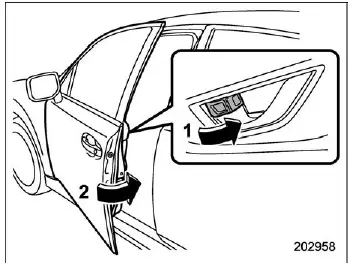
- Move the lock lever forward.
- Close the door.
This method locks only the specific door operated on the Subaru Ascent.
Locking using power door locking switch
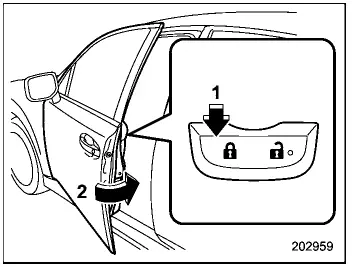
- Press the lock side of the power door locking switch.*
- Close the door.
*: Refer to "How to operate the power door locking switches" for more details.
Using this method, all doors, the rear gate, and the fuel filler lid of the Subaru Ascent will lock simultaneously.
NOTE
Always confirm that the Subaru Ascent key is not left inside the vehicle before locking the doors from the outside.
 Door locks
...
 Locking and unlocking from the inside
How to use the lock lever
Move the lock lever rearward to unlock the door.
Move the lock lever forward to lock the door.
Before driving your Subaru Ascent, always ensure that all doors an ...
Other materials:
Dtc b1832 short in curtain airbag rh squib circuit (to ground)
AIRBAG SYSTEM (DIAGNOSTICS) > Diagnostic Chart with Trouble CodeDTC B1832 SHORT IN CURTAIN AIRBAG RH SQUIB CIRCUIT (TO GROUND)Diagnosis start condition:Ignition voltage is 10 V to 16 V.DTC detecting condition:• Curtain airbag harness (RH) circuit is shorted to ground.• Curtain airbag ...
Maintenance schedule
U.S. models
The scheduled maintenance items required
to be serviced at regular intervals
are shown in the "Warranty and Maintenance
Booklet". For details, read the
separate "Warranty and Maintenance
Booklet".
Canada models
The scheduled maintenance items required
to be serviced at regular i ...
How to change the source
The Pandora operation screen can be
reached by the following methods:
Connecting a Pandora device. Refer to
"Connecting a Bluetooth device" F5-68 or
"Connecting and disconnecting a USB
memory/portable device" F5-17.
Select the "Pandora" key on the source
select screen. Refer to "Selec ...
