
Subaru Crosstrek Service Manual: Location
ENTERTAINMENT > General Description
LOCATION
1. AUDIO AND NAVIGATION SYSTEM
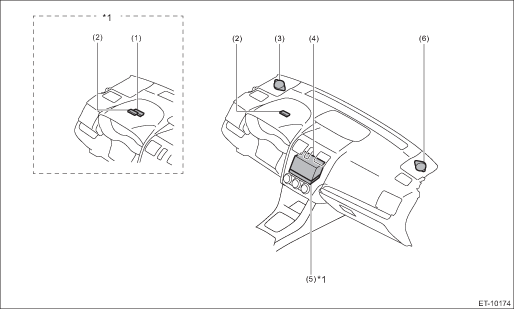
(1) | Telematics sub antenna | (3) | Speaker ASSY - tweeter front LH | (5) | Data communication module |
(2) | GPS antenna ASSY | (4) | Audio ASSY or navigation ASSY | (6) | Speaker ASSY - tweeter front RH |
*1: Model with telematics | |||||
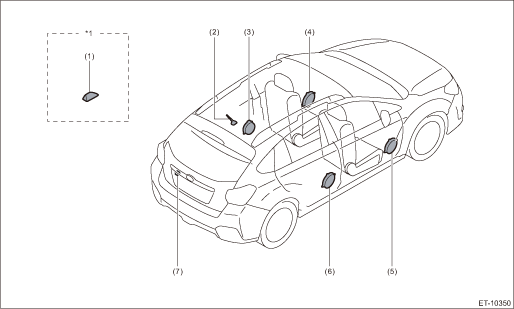
(1) | Telematics antenna | (4) | Front door speaker ASSY LH | (6) | Rear door speaker ASSY RH |
(2) | Antenna ASSY - roof | (5) | Front door speaker ASSY RH | (7) | Rearview camera ASSY |
(3) | Rear door speaker ASSY LH | ||||
*1: Model with telematics | |||||
2. TELEMATICS SYSTEM
Refer to “LOCATION” of “TELEMATICS SYSTEM (DIAGNOSTICS)” section. Electrical Component Location > LOCATION">
 Component
ENTERTAINMENT > General DescriptionCOMPONENT1. DATA COMMUNICATION MODULE(1)Cap screw(4)Backup batteryTightening torque: N·m (kgf-m, ft-lb)(2)Backup battery cover(5)Data communication moduleT ...
 Gps antenna
...
Other materials:
Inspection
FUEL INJECTION (FUEL SYSTEMS)(H4DO) > Oil Control SolenoidINSPECTION1. Check that the oil control solenoid has no deformation, cracks or other damages.2. Measure the resistance between the oil control solenoid terminals.Terminal No.Standard1 and 27.25±0.4 ? (when 20°C (68°F ...
How to use the rear view camera
When the shift lever/select lever is set to
"R", the rear view camera automatically
displays the rear view image from the
vehicle. When the lever is set to other
positions, the image before setting to "R"
is displayed.
1. Set the ignition switch to "ON".
2. Set the shift lever/select leve ...
Components
The Subaru Ascent SRS airbag system includes multiple strategically placed components
designed to provide comprehensive protection to occupants during various types of
collisions.
Driver's SRS frontal airbag: located in the center of the steering wheel
Front passenger's SRS fro ...
