
Subaru Ascent 2018-2026 Owner's Manual: Interior lights
CAUTION
When exiting your Subaru Ascent, always ensure that all interior lights are switched off to prevent unnecessary battery discharge and maintain proper vehicle readiness.
Map lights
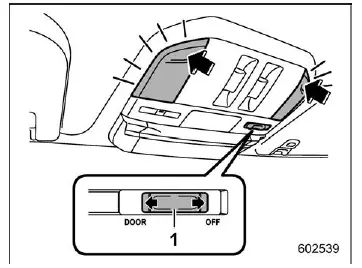
- Door interlock switch
In the Subaru Ascent, the map lights provide convenient illumination for the front seating area. To turn the map light on, gently press the lens. Pressing it again will turn the light off.
Automatic illumination
When the door interlock switch is set to the "DOOR" position, the Subaru Ascent map lights will automatically illuminate under the following conditions:
- When any door (except the rear gate) is opened.
- When the doors are unlocked using the keyless access system or remote keyless entry.
- When the ignition switch is turned from the "ON" or "ACC" position to the "LOCK"/"OFF" position.
Reading light
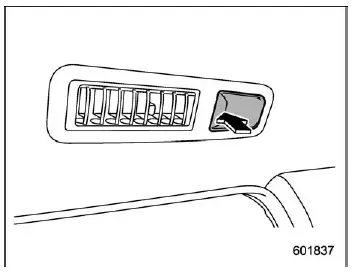
The reading lights in the Subaru Ascent are designed to provide focused lighting for passengers. To switch them on, press the lens. Press again to turn them off.
Automatic illumination
The reading lights in the Subaru Ascent will illuminate automatically in the following situations, regardless of the position of the map light switch:
- When any door (except the rear gate) is opened.
- When the doors are unlocked using the keyless access system (if equipped).
- When the doors are unlocked using the remote keyless entry system.
- When the ignition is switched from "ON" or "ACC" to "LOCK"/"OFF".
Cargo area light
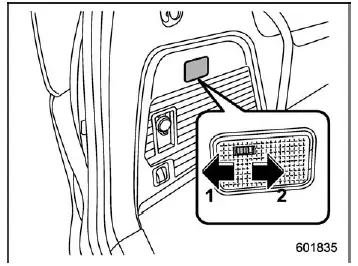
- DOOR
- OFF
In the Subaru Ascent cargo area, the lighting system enhances visibility when loading or unloading items.
DOOR: The light turns on automatically when the rear gate is opened. After closing the rear gate, the light remains illuminated briefly before gradually turning off.
OFF: The light remains completely выключенным regardless of door position.
OFF delay timer
The Subaru Ascent includes a smart delay function for interior lighting, allowing certain lights to remain on briefly after doors are closed.
- Reading light
- Map light
- Cargo area light
When the light switch is set to the "DOOR" position (excluding reading lights), illumination will automatically respond to door locking/unlocking, opening/closing, and ignition status.
NOTE
The duration of the OFF delay timer in the Subaru Ascent can be customized through the center information display or adjusted by a SUBARU dealer for personalized convenience.
One-touch Interior Illumination function
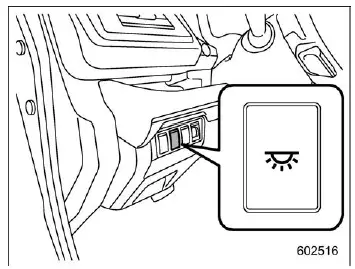
The Subaru Ascent features a convenient one-touch interior lighting function. Press the dedicated switch once to activate both the map lights (when set to "DOOR") and the reading lights simultaneously.
The lights activated by this function will turn off automatically under the following conditions:
- Pressing the one-touch illumination switch again.
- Locking the vehicle using the key fob or transmitter.
- Locking the vehicle via the door handle while carrying the access key (if equipped).
- Locking the rear gate using the power rear gate switch while holding the key fob.
NOTE
- If the interior lights are turned on by another function, the one-touch switch will not override them.
- If the Subaru Ascent battery protection system activates, interior lights will automatically turn off to prevent battery drain.
 Cabin Connect
The Subaru Ascent features the innovative "Cabin Connect" function, which allows
the driver or front passenger to communicate clearly with third-row occupants without
raising their voice ...
 Sun visors
The sun visors in the Subaru Ascent are designed to reduce glare from sunlight
and improve driving visibility. Simply lower the visor to block direct sunlight
from the front.
For side protect ...
Other materials:
Assembly
CONTROL SYSTEMS > MT Gear Shift LeverASSEMBLYNOTE:• Clean all the parts before assembly.• Apply NIGTIGHT LYW No. 2 grease or equivalent to each part. General Description > COMPONENT">1. Mount the bushing and cushion rubber to the stay.(A)Bushing(B)Stay(C)Cushion rubber2. I ...
Inspection
GLASS/WINDOWS/MIRRORS > Remote Control Mirror SystemINSPECTION1. SYMPTOM CHARTSymptomsInspection orderAll function does not operate.(1) Check the fuse.(2) Check the remote control mirror switch.(3) Check the wiring harness.One side of the mirror motor does not operate.(1) Check the remote control ...
Removal
EMISSION CONTROL (AUX. EMISSION CONTROL DEVICES)(H4DO) > EGR PipeREMOVAL1. Disconnect the ground cable from battery.2. Remove the clip (A), and loosen the clamps (B) and (C) securing the air intake boot.3. Remove the air intake boot from the air cleaner case (rear) and throttle body, and move the ...
