
Subaru Crosstrek Owners Manual: Installing a rearward facing child restraint

1. Place the child restraint system in the rear seating position.
2. Run the lap and shoulder belt through or around the child restraint system following the instructions provided by its manufacturer.
3. Insert the tongue plate into the buckle until you hear a click.
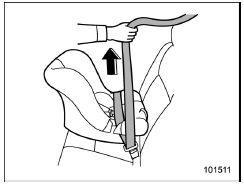
4. Take up the slack in the lap belt.
5. If using the seatbelt in the ALR mode is recommended by the manufacturer's instructions supplied with the child restraint system, perform the following procedure.
(1) Pull out the seatbelt fully from the retractor to change the retractor over from the Emergency Locking Retractor (ELR) to the Automatic Locking Retractor (ALR) mode.
(2) Allow the belt to rewind into the retractor. As the belt is rewinding, clicks will be heard which indicate the retractor functions as ALR.
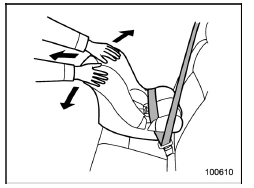
6. Push and pull the child restraint system forward and from side to side to check if it is firmly secured. Sometimes a child restraint can be more firmly secured by pushing it down into the seat cushion and then tightening the seatbelt.
7. Pull at the shoulder portion of the belt to confirm that it cannot be pulled out (ALR properly functioning).
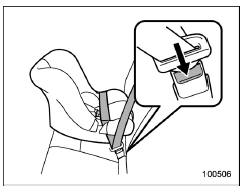
8. To remove the child restraint system, press the release button on the seatbelt buckle and allow the belt to retract completely. The belt will return to the ELR mode.
WARNING
NEVER INSTALL A FORWARD OR REARWARD FACING CHILD SEAT IN THE FRONT PASSENGER'S SEAT. DOING SO RISKS SERIOUS INJURY OR DEATH TO THE CHILD BY PLACING THE CHILD'S HEAD TOO CLOSE TO THE SRS AIRBAG.
NOTE
When the child restraint system is no longer in use, remove it and restore the ELR function of the retractor. That function is restored by allowing the seatbelt to retract fully.
 Installing child restraint systems with ALR/ELR seatbelt
WARNING
Child restraint systems and seatbelts
can become hot in a vehicle
that has been closed up in sunny
weather; they could burn a small
child. Check the child restraint
system before ...
 Installing forward facing child restraint
WARNING
Before installing a child restraint
system, be sure to confirm that the
seatback is securely locked into
place. Otherwise, in an accident,
serious injury or death could result.
1. Shake ...
Other materials:
Selection of manual mode
With the vehicle either moving or stationary,
move the select lever from the "D"
position to the "M" position to select the
manual mode.
Type A
Upshift indicator
Downshift indicator
Gear position indicator
Type B
Upshift indicator
Downshift indicator
Gear position indi ...
Specification
INSTRUMENTATION/DRIVER INFO > General DescriptionSPECIFICATION1. COMBINATION METER ASSEMBLYNOTE:Specifications of the combination meter vary depending on the market and the grade.• Model with normal meterMeter, displayOperation method, display methodDrive controlWhen checking the indicator ...
Installation
HVAC SYSTEM (HEATER, VENTILATOR AND A/C) > EvaporatorINSTALLATIONCAUTION:• If the evaporator assembly - cooling has been replaced, add an appropriate amount of compressor oil. Compressor Oil > ADJUSTMENT">• When the evaporator assembly - cooling has been replaced, replace ...
