
Subaru Crosstrek Service Manual: Installation
AIRBAG SYSTEM > Front Sub Sensor
INSTALLATION
CAUTION:
• If the airbag has been activated, replace the front sub sensor with a new part.
• Do not reuse the bolt and nut.
Always replace with the specified new bolts and nuts.
• When installing the sensor, insert the set pin on the backside of the sensor into the hole on the body side securely.
1. Before installation, inspect the following items and replace any faulty part with a new part.
• Front sub sensor damage
• Connector damage
2. Install each part in the reverse order of removal.
CAUTION:
• Install so that the front end of the under cover (b) comes inside the bumper face - front (a), and the front end of the mud guard (c) comes outside the bumper face - front (a).
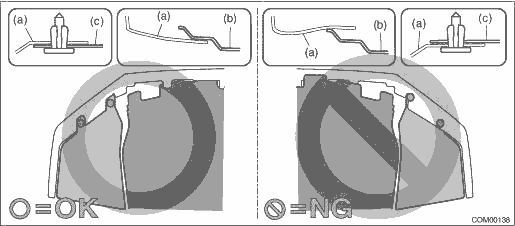
• Before installing the bumper face, match the claws on the bracket - front bumper with the engaging position of flange section on the bumper face side. If the engaging position is not correct, the flange section may be broken or the clearance between fender panel and bumper face may not be uniform.
Tightening torque:
Front sub sensor: 13 N·m (1.33 kgf-m, 9.6 ft-lb)
Bumper beam COMPL - front: 32 N·m (3.36 kgf-m, 24.3 ft-lb)
 Front sub sensor
...
 Removal
AIRBAG SYSTEM > Front Sub SensorREMOVALCAUTION:Before handling the airbag system components, refer to “CAUTION” of “General Description” in “AIRBAG SYSTEM”. Gen ...
Other materials:
Fuel filler lid and cap
Locations of the fuel filler lid and
the lid release lever
Fuel filler lid
Fuel filler lid release lever
Refueling
Only one person should be involved in
refueling. Do not allow others to approach
the area of the vehicle near the fuel filler
pipe while refueling is in progress.
Be ...
Dtc p0030 a/f / o2 heater control circuit bank 1 sensor 1
ENGINE (DIAGNOSTICS)(H4DO) > Diagnostic Procedure with Diagnostic Trouble Code (DTC)DTC P0030 A/F / O2 HEATER CONTROL CIRCUIT BANK 1 SENSOR 1DTC detecting condition:Detected when two consecutive driving cycles with fault occur.CAUTION:After servicing or replacing faulty parts, perform Clear Memor ...
Dtc c1341 rl hold valve
VEHICLE DYNAMICS CONTROL (VDC) (DIAGNOSTICS) > Diagnostic Procedure with Diagnostic Trouble Code (DTC)DTC C1341 RL HOLD VALVENOTE:For the diagnostic procedure, refer to “DTC C1362 NORMAL CLOSING VALVE 2”. Diagnostic Procedure with Diagnostic Trouble Code (DTC) > DTC C1362 NORMAL C ...
