
Subaru Crosstrek Service Manual: Installation
POWER ASSISTED SYSTEM (POWER STEERING) > Electric Power Steering Gearbox
INSTALLATION
1. Insert the steering gearbox assembly into crossmember, being careful not to damage the boot of the steering gearbox assembly.
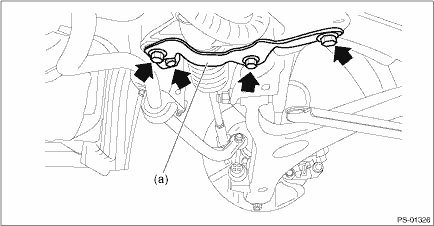
2. Install the steering gearbox assembly to the crossmember by tightening the bolts through the stiffener (a) to the specified torque.
Tightening torque:
60 N·m (6.12 kgf-m, 44.3 ft-lb)
3. Install the universal joint assembly - steering. Universal Joint > INSTALLATION">
CAUTION:
Tighten the bolts of the universal joint assembly - steering in the order of steering gearbox side and column shaft side.
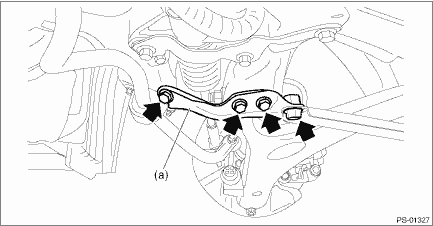
4. Install the support plate - front crossmember (a).
Tightening torque:
Support plate - front crossmember: 60 N·m (6.12 kgf-m, 44.3 ft-lb)
Front support: 100 N·m (10.20 kgf-m, 73.8 ft-lb)
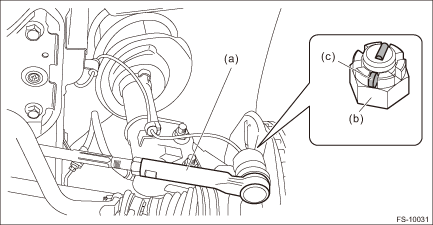
5. Connect the tie-rod ends and knuckle arm.
(1) Connect the tie-rod end (a) to the housing assembly - front axle.
(2) Tighten the castle nuts (b) to the specified torque.
CAUTION:
During connection, do not hit the cap at bottom of tie-rod end with a hammer.
Castle nut tightening torque:
27 N·m (2.75 kgf-m, 19.9 ft-lb)
(3) Tighten within the range of 60° so that the cotter pin hole and cutout portion of the castle nut (b) are aligned.
(4) Insert the cotter pin (c), and bend the tip of the pin to fix it.
6. Install the front crossmember - support.
Tightening torque:
60 N·m (6.12 kgf-m, 44.3 ft-lb)
7. Install the front exhaust pipe assembly. Front Exhaust Pipe > INSTALLATION">
8. Install the under cover - front. Front Under Cover > INSTALLATION">
9. Install the front wheels.
10. Lower the vehicle.
11. Tighten the wheel nuts to the specified torque.
Tightening torque:
Except for C4 model: 120 N·m (12.24 kgf-m, 88.5 ft-lb)
C4 model: 100 N·m (10.20 kgf-m, 73.8 ft-lb)
12. Connect the power steering control module harness connector.
13. Connect the battery ground terminal.
CAUTION:
When the wheel alignment has been adjusted, perform the adjustment of the steering angle sensor.
– Model without EyeSight: VDC sensor midpoint setting mode VDC Control Module and Hydraulic Control Unit (VDCCM&H/U) > ADJUSTMENT">
– Model with EyeSight: Neutral of Steering Angle Sensor & Lateral G Sensor 0 point setting VDC Control Module and Hydraulic Control Unit (VDCCM&H/U) > ADJUSTMENT">
– Model with EyeSight: Longitudinal G sensor & lateral G sensor 0 point setting VDC Control Module and Hydraulic Control Unit (VDCCM&H/U) > ADJUSTMENT">
14. After adjusting toe-in and steering angle, tighten the lock nut on tie-rod end.
Tightening torque:
85 N·m (8.67 kgf-m, 62.7 ft-lb)
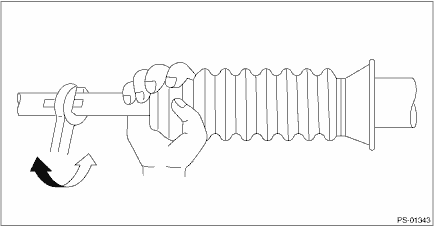
NOTE:
When adjusting toe-in, hold the boot - steering gearbox as shown to prevent it from being rotated or twisted. If it becomes twisted, straighten it.
 Inspection
POWER ASSISTED SYSTEM (POWER STEERING) > Electric Power Steering GearboxINSPECTION1. UNIT INSPECTIONCheck components for wear, damage or other faults. Adjust or replace if necessary.2. LIMITMake a ...

Other materials:
Dtc b28b8 eyesight steering switch 1
EyeSight (DIAGNOSTICS) > Diagnostic Procedure with Diagnostic Trouble Code (DTC)DTC B28B8 EyeSight STEERING SWITCH 1Detected when EyeSight steering switch is not installed or has malfunction, or when the harness is faulty or open-circuited or in stuck ON condition.DTC detecting condition:• ...
Disc brake pad and disc Inspection
PERIODIC MAINTENANCE SERVICES > Disc Brake Pad and DiscINSPECTIONRefer to “BR” section for disc brake pad and disc inspection. Front Brake Pad > INSPECTION"> Rear Brake Pad > INSPECTION"> Front Disc Rotor > INSPECTION"> Rear Disc Rotor > INSPECT ...
Installation
GLASS/WINDOWS/MIRRORS > Power Window Control SwitchINSTALLATIONCAUTION:• After installing the switch - power window main, always perform the initial setting.Failure to do so may cause the improper activation of auto-reverse operation for pinching hazard prevention.• Use protective pap ...
