
Subaru Crosstrek Service Manual: Installation
CLUTCH SYSTEM > Master Cylinder
INSTALLATION
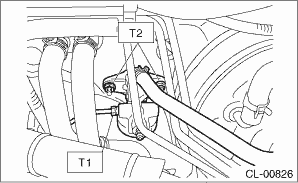
1. Install the master cylinder to the body, and connect the clutch pipe and the tank hose.
Tightening torque:
T1: 15 N·m (1.5 kgf-m, 11.1 ft-lb)
T2: 18 N·m (1.8 kgf-m, 13.3 ft-lb)
2. Connect the push rod of the master cylinder, and install the clevis pin and snap pin.
CAUTION:
Always use a new clevis pin.
NOTE:
Apply grease to the clevis pin.
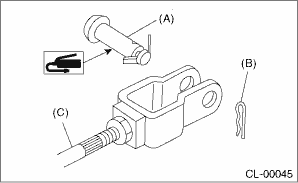
(A) | Clevis pin |
(B) | Snap pin |
(C) | Push rod |
3. Install the knee airbag module. Knee Airbag Module > INSTALLATION">
4. Fill the recommended brake fluid. Clutch Fluid">
5. After bleeding air from the clutch system, ensure that the clutch operates properly. Clutch Fluid Air Bleeding">
6. Install the cover assembly - instrument panel LWR driver. Instrument Panel Lower Cover > INSTALLATION">
7. Install the air intake boot. Air Intake Boot > INSTALLATION">
8. Connect the battery ground terminal.
 Inspection
CLUTCH SYSTEM > Master CylinderINSPECTIONIf any damage, deformation, wear, swelling, rust or other faults are found on the cylinder, piston, push rod, nipple, return spring, bleeder screw, seat or ...

Other materials:
Inspection
SPEED CONTROL SYSTEMS(H4DO) > Accelerator PedalINSPECTION1. CHECK ACCELERATOR PEDAL SENSOR AREA (METHOD WITH CIRCUIT TESTER)1. Remove the glove box. Glove Box > REMOVAL">2. Turn the ignition switch to ON. (Engine OFF)3. Measure the voltage between ECM connector terminals.• Main ...
Refrigerant leak check Inspection
HVAC SYSTEM (HEATER, VENTILATOR AND A/C) > Refrigerant Leak CheckINSPECTION1. Attach the manifold gauge set.Preparation tool:Manifold gauge set(1) Check that all valves are fully closed.(2) Install the low/high pressure hoses to the service ports on the low/high pressure sides of the vehicle resp ...
Dtc p0138 o2 sensor circuit high voltage bank 1 sensor 2
ENGINE (DIAGNOSTICS)(H4DO) > Diagnostic Procedure with Diagnostic Trouble Code (DTC)DTC P0138 O2 SENSOR CIRCUIT HIGH VOLTAGE BANK 1 SENSOR 2DTC detecting condition:Detected when two consecutive driving cycles with fault occur.CAUTION:After servicing or replacing faulty parts, perform Clear Memory ...
