
Subaru Crosstrek Service Manual: Installation
CLUTCH SYSTEM > Flywheel
INSTALLATION
1. Press in a new pilot bearing to the position where it is flush with the flywheel surface or up to 0.4 mm (0.016 in) deeper than that.
CAUTION:
Do not press the bearing inner ring.
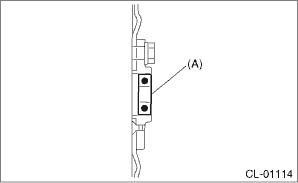
(A) | Pilot bearing |
2. Temporarily tighten the crankshaft position sensor plate and flywheel.
NOTE:
Align the knock pin hole of the crankshaft position sensor plate to the knock pin of the crankshaft to secure the knock pin.
3. Attach the ST.
| ST 498497100 | CRANKSHAFT STOPPER |
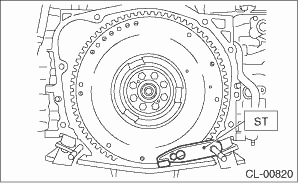
4. Tighten the flywheel mounting bolts in two stages.
(1) Tighten the flywheel attachment bolts.
Tightening torque:
30 N·m (3.1 kgf-m, 22.1 ft-lb)
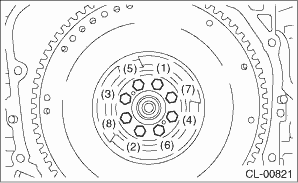
(2) While checking the tightening angle with the angle gauge, further tighten the flywheel mounting bolts.
Tightening angle:
30° — 35°
5. Install the clutch disc and clutch cover. Clutch Disc and Cover > INSTALLATION">
6. Install the transmission assembly. Manual Transmission Assembly > INSTALLATION">
 Removal
CLUTCH SYSTEM > FlywheelREMOVAL1. Remove the transmission assembly. Manual Transmission Assembly > REMOVAL">2. Remove the clutch cover and clutch disc. Clutch Disc and Cover > REMOV ...

Other materials:
Dtc b14e6 mode door actuator stepping motor circuit short-circuit
HVAC SYSTEM (AUTO A/C) (DIAGNOSTICS) > Diagnostic Procedure with Diagnostic Trouble Code (DTC)DTC B14E6 MODE DOOR ACTUATOR STEPPING MOTOR CIRCUIT SHORT-CIRCUITDTC detecting condition:Mode door actuator stepping motor circuit is shorted.Trouble symptom:Vent does not change.Wiring diagram:Air condi ...
Note
LIGHTING SYSTEM > Interior Light SystemNOTEFor operation procedures of each component of the interior light system, refer to the respective section.• Spot map light: Spot Map Light">• Room light: Room Light">• Luggage room light: Luggage Room Light">&b ...
Installation
AIRBAG SYSTEM > Side Airbag SensorINSTALLATIONCAUTION:Do not reuse the bolt and nut.Always replace with the specified new bolts and nuts.1. Before installation, inspect the following items and replace any faulty part with a new part.• The side airbag sensor, sensor bracket, or connector are ...
