
Subaru Crosstrek Service Manual: Installation
BRAKE > Brake Booster
INSTALLATION
1. Check and adjust the operating rod of the vacuum booster assembly.
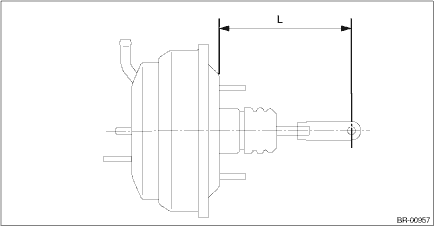
(1) Measure the length between the vacuum booster assembly mounting surface and clevis pin hole.
(2) If it is not within the specification, loosen the lock nut, rotate the vacuum booster assembly operating rod to adjust the rod length.
Specification L:
136.3 mm (5.37 in)
2. Install each part in the reverse order of removal.
CAUTION:
• Apply grease to the snap pin to prevent the operating rod from wear.
• Replace the clevis pin with new parts, and apply thin coat of NIGTIGHT LYW No. 2 grease to the clevis pin.
• When installing the master cylinder assembly, replace the seal sub assembly with a new part, and install it to the vacuum booster assembly.
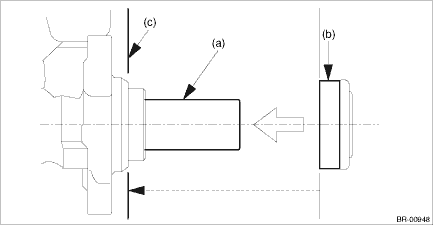
(a) | Primary piston | (b) | Seal sub ASSY | (c) | Install the seal sub ASSY to this surface. |
Tightening torque:
Vacuum booster assembly: 18 N·m (1.84 kgf-m, 13.3 ft-lb)
Master cylinder assembly: 13 N·m (1.33 kgf-m, 9.6 ft-lb)
Brake pipe flare nut: 19 N·m (1.94 kgf-m, 14.0 ft-lb)
Operating lock nut: 22 N·m (2.24 kgf-m, 16.2 ft-lb)
Knee airbag module: 7.5 N·m (0.76 kgf-m, 5.5 ft-lb)
3. Install the air conditioner pipe. General Description > COMPONENT">
4. Charge refrigerant. Refrigerant Charging Procedure > PROCEDURE">
5. Bleed air from the brake system. Air Bleeding > PROCEDURE">
6. Perform a road test to make sure the brakes do not drag.
 Removal
BRAKE > Brake BoosterREMOVALCAUTION:• Do not allow brake fluid to come in contact with the painted surface of the vehicle body. If it does, wash off with water and wipe away completely.• ...
 Brake fluid
...
Other materials:
Dtc b11f2 front impact deployment
AIRBAG SYSTEM (DIAGNOSTICS) > Diagnostic Chart with Trouble CodeDTC B11F2 FRONT IMPACT DEPLOYMENTDIAGNOSIS START CONDITION:Ignition voltage is 10 V to 16 V.DTC DETECTING CONDITION:This DTC is indicated when the front airbag module and the pretensioner are deployed.Once this DTC is displayed, the ...
Dtc c0061 normal opening valve 1 malfunction
VEHICLE DYNAMICS CONTROL (VDC) (DIAGNOSTICS) > Diagnostic Procedure with Diagnostic Trouble Code (DTC)DTC C0061 NORMAL OPENING VALVE 1 MALFUNCTIONNOTE:For the diagnostic procedure, refer to “C0064 NORMAL CLOSING VALVE 2 MALFUNCTION”. Diagnostic Procedure with Diagnostic Trouble Code ...
Preparation tool
INSTRUMENTATION/DRIVER INFO > General DescriptionPREPARATION TOOL1. SPECIAL TOOLILLUSTRATIONTOOL NUMBERDESCRIPTIONREMARKS — SUBARU SELECT MONITOR 4Used for setting of each function and troubleshooting for electrical system.NOTE:For detailed operation procedures of Subaru Select Monitor 4, refer ...
