
Subaru Crosstrek Service Manual: Inspection
HVAC SYSTEM (HEATER, VENTILATOR AND A/C) > FRESH/RECIRC Door Actuator
INSPECTION
1. CHECK LINK
1. Visually check the operation range of the link, and remove the foreign material if any.
2. Operate the FRESH/RECIRC switch to check that the link operates normally.
3. If it does not operate normally as the result of inspection, check the motor - actuator blower.
2. CHECK ACTUATOR
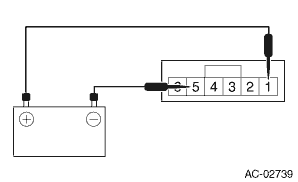
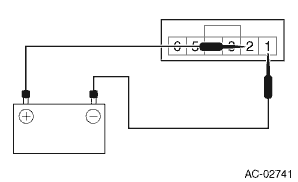
1. Check the actuator operation when battery voltage is applied between the terminals of actuator.
CAUTION:
Disconnect the battery immediately after the actuator stops operation. Otherwise, the motor may be damaged.
• Manual A/C model
Terminal No. | Inspection conditions | Operating position | Connection diagram |
5 (+) — 1 (−) | Connect battery to the terminals | RECIRC |
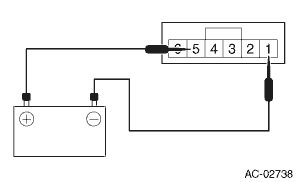
1 (+) — 5 (−)
FRESH
• Auto A/C model
Terminal No. | Inspection conditions | Operating position | Connection diagram |
1 (+) — 2 (−) | Connect battery to the terminals | RECIRC |
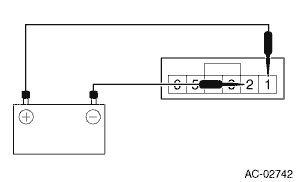
2 (+) — 1 (−)
FRESH
2. If it does not operate normally as the result of inspection, replace the motor - actuator blower.

 Removal
HVAC SYSTEM (HEATER, VENTILATOR AND A/C) > FRESH/RECIRC Door ActuatorREMOVALCAUTION:Before handling the airbag system components, refer to “CAUTION” of “General Description” ...
Other materials:
Certification for the BSD/RCTA
U.S.-spec. models:
FCC ID: OAYSRR2A
CAUTION
FCC WARNING
Changes or modifications not expressly
approved by the party responsible
for compliance could void
the user's authority to operate the
equipment.
This device complies with part 15 of the
FCC Rules. Operation is subject to the
followi ...
Adjustment
CONTINUOUSLY VARIABLE TRANSMISSION(TR580) > Differential Gear OilADJUSTMENTNOTE:Immediately after removing the overflow drain plug, remaining gear oil (approx. 8 cc) may come out of the overflow pipe. This is not included in the specified amount. When removing the overflow drain plug, make sure t ...
Headlight flasher
CAUTION
Do not hold the lever in the flashing
position for more than just a few
seconds.
To flash the headlights, pull the lever
toward you and then release it. The high
beam will stay on for as long as you hold
the lever. The headlight flasher works
even though the lighting switch is in ...
