
Subaru Ascent 2018-2026 Owner's Manual: Front seat heater and ventilation
Front seat heater
In the Subaru Ascent, the front seat heating system is designed to provide enhanced comfort during cold weather and operates only when the ignition switch is in the "ON" position.
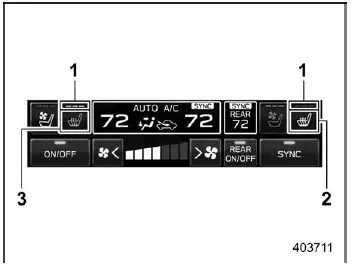
- Seat heater indicator
- Front passenger's seat heater icon
- Driver's seat heater icon
To activate the seat heater in the Subaru Ascent, tap the corresponding driver or passenger seat heater icon on the climate control screen.
Each press cycles through the available heating levels:
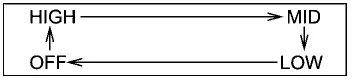
HIGH: Three indicator lights illuminate for maximum heat output.
MID: Two indicator lights illuminate for moderate warmth.
LOW: One indicator light illuminates for gentle heating.
OFF: All indicator lights turn off, disabling the function.
Selecting HIGH mode allows the Subaru Ascent seat to warm up quickly, making it ideal for extremely cold conditions.
Pressing and holding the seat heater icon will immediately turn the system off regardless of the current setting.
NOTE
The Subaru Ascent does not allow simultaneous operation of seat heating and seat ventilation for the same seat.
Front seat ventilation
The front seat ventilation system in the Subaru Ascent improves comfort in warm weather by circulating air through the seat surface. This function is also available only when the ignition is in the "ON" position.
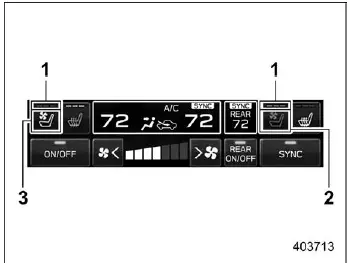
- Seat ventilation indicator
- Front passenger's seat ventilation icon
- Driver's seat ventilation icon
Activate the ventilation system by tapping the seat ventilation icon for the driver or passenger in the Subaru Ascent.
Each press cycles through the following airflow levels:
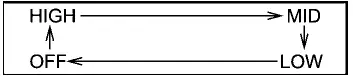
HIGH: Three lights indicate maximum airflow.
MID: Two lights indicate medium airflow.
LOW: One light indicates minimal airflow.
OFF: No lights indicate that ventilation is disabled.
Pressing and holding the ventilation icon in the Subaru Ascent will turn off the system immediately from any level.
 Manual climate control operation for rear climate control
The Subaru Ascent allows rear passengers to adjust climate settings either through
the rear climate control panel or via the central information display.
To access rear climate control settings on ...
 Defrosting
Select the "
"
or "
"
mode to quickly defrost or remove moisture from the windshield and front side windows
in the Subaru Ascent.
NOTE
When either defrost mode is ...
Other materials:
Dtc b1655 front buckle switch rh failure
OCCUPANT DETECTION SYSTEM (DIAGNOSTICS) > Diagnostic Procedure with Diagnostic Trouble Code (DTC)DTC B1655 FRONT BUCKLE SWITCH RH FAILUREDiagnosis start condition:Ignition voltage is 8 V to 16 V.DTC detecting condition:• Passenger’s buckle switch circuit is open, shorted or shorted to ...
Preparation tool
EyeSight > General DescriptionPREPARATION TOOL1. SPECIAL TOOLILLUSTRATIONTOOL NUMBERDESCRIPTIONREMARKS87599VA000RANDOM CHARTUsed for adjusting stereo camera. — SUBARU SELECT MONITOR 4Used for setting of each function and troubleshooting for electrical system.NOTE:For detailed operation procedur ...
About HD RadioTM technology (if
equipped)
HD RadioTM Technology is the digital
evolution of analog AM/FM radio. Your
radio product has a special receiver which
allows it to receive digital broadcasts
(where available) in addition to the analog
broadcasts it already receives. Digital
broadcasts have better sound quality than
analog br ...
