
Subaru Crosstrek Owners Manual: Front passenger's frontal airbag ON and OFF indicators
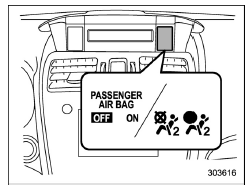
 Front
passenger's frontal airbag ON
indicator
Front
passenger's frontal airbag ON
indicator
 Front
passenger's frontal airbag OFF
indicator
Front
passenger's frontal airbag OFF
indicator
The front passenger's frontal airbag ON and OFF indicators show you the status of the front passenger's SRS frontal airbag.
The indicators are located next to the clock in the center portion of the dashboard.
When the ignition switch is turned to the "ON" position, both the ON and OFF indicators illuminate for 6 seconds during which time the system is checked. Following the system check, both indicators turn off for 2 seconds. After that, one of the indicators illuminates depending on the status of the front passenger's SRS frontal airbag determined by the SUBARU advanced frontal airbag system monitoring.
If the front passenger's SRS frontal airbag is activated, the passenger's frontal airbag ON indicator will illuminate while the OFF indicator will remain off.
If the front passenger's SRS frontal airbag is deactivated, the passenger's frontal airbag ON indicator will remain off while the OFF indicator will illuminate.
With the ignition switch turned to the "ON" position, if both the ON and OFF indicators remain illuminated or off simultaneously even after the system check period, the system is malfunctioning.
Contact your SUBARU dealer immediately for an inspection.
 SRS airbag system warning light
WARNING
If the warning light exhibits any of
the following conditions, there may
be a malfunction in the seatbelt
pretensioners and/or SRS airbag
system. Immediately take your vehicle
to your ...
 Check engine warning light/Malfunction indicator light
CAUTION
If the CHECK ENGINE light illuminates
while you are driving, have
your vehicle checked/repaired by
your SUBARU dealer as soon as
possible. Continued vehicle operation
without having the ...
Other materials:
Tongue load
Tongue load
Ensure that the trailer tongue load is from
8 to 11 percent of the total trailer weight
and does not exceed the maximum value
of 200 lbs (90 kg).
Jack
Bathroom scale
The tongue load can be weighed with a
bathroom scale as shown in the illustration
above. When weighing ...
Dtc p0700 transmission control system (mil request)
ENGINE (DIAGNOSTICS)(H4DO) > Diagnostic Procedure with Diagnostic Trouble Code (DTC)DTC P0700 TRANSMISSION CONTROL SYSTEM (MIL REQUEST)NOTE:For the diagnostic procedure, refer to CVT section. Basic Diagnostic Procedure">1. OUTLINE OF DIAGNOSISJudge as NG when there is CAN communication w ...
Removal
MECHANICAL(H4DO) > Crank PulleyREMOVALNOTE:When replacing a single part, perform the work with the engine assembly installed to body.1. When working on the vehicleNOTE:When working on the vehicle, perform the following steps also.(1) Remove the radiator main fan & fan motor assembly and radia ...
