
Subaru Ascent 2018-2026 Owner's Manual: Car information screen
1. Touch
 (HOME) to open the main menu of the Subaru Ascent system interface.
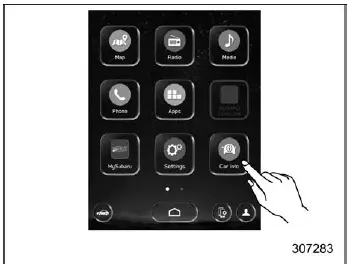
2.
 (Car Info)
Driving Statistics screen
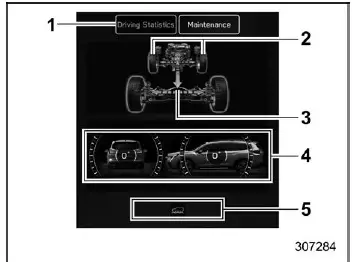
- Driving Statistics
- Steering angle
- Running condition
- Vehicle posture
- Telltale screen
The Driving Statistics screen in the Subaru Ascent provides detailed insight into vehicle behavior and operational status. It displays real-time data related to driving dynamics, allowing the driver to better understand how the vehicle responds under various conditions.
Active systems and functions are visually indicated through illuminated or flashing indicators, helping the driver quickly identify which systems are currently engaged.
NOTE
- The vehicle posture indication in the Subaru Ascent may not always perfectly reflect the actual physical angle of the vehicle.
- When X-MODE is activated, the center information display automatically switches to the dedicated X-MODE screen.
- Vehicle tilt readings can be influenced not only by road conditions but also by passenger load, cargo weight, and acceleration or braking forces.
Maintenance screen
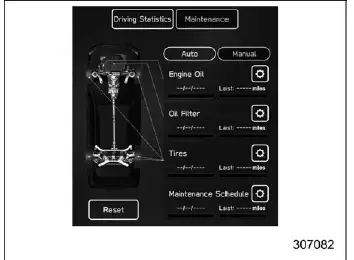
The Subaru Ascent maintenance screen allows drivers to configure and manage service reminders, helping ensure timely vehicle maintenance and optimal performance.
Engine Oil change reminder:
1. Select "Maintenance" from the second menu within the Car Info screen.
2.
 (Engine Oil).
3. Choose either "Notification Date" or "Notification Distance" based on your preferred reminder method.
4.
 "Set".
5.

 to configure the desired value.
Oil Filter change reminder: The setup procedure is identical to the Engine Oil reminder, but select the "Oil Filter" option in step 2.
Tires rotation reminder: The configuration steps are the same as the Engine Oil reminder, but choose the "Tires" option in step 2.
Maintenance Schedule setting: The procedure follows the same steps as above, with "Maintenance Schedule" selected in step 2.
NOTE
- Touch "Reset" to clear the configured reminder values.
- Touch "Update" to restore default factory settings.
 How to select items on the screen
ON/OFF setting
Example
Within the Subaru Ascent interface, settings can be easily enabled or disabled
by touching the corresponding option and selecting ON
or OFF
.
This intuitive toggl ...
 Clock
Clock
In the Subaru Ascent, vehicles equipped with a genuine SUBARU navigation and/or
audio system allow the clock to be configured either automatically or manually,
depending on driver preference and s ...
Other materials:
Operating tips for heater and air conditioner
Cleaning ventilation grille
Front ventilation inlet grille
To maintain optimal performance of the Subaru Ascent climate system, always keep
the ventilation inlet grille free from snow, debris, leaves, or dirt. Blockages
can reduce heating efficiency and impair defrosting capability.
...
Installation
CONTINUOUSLY VARIABLE TRANSMISSION(TR580) > Torque Converter AssemblyINSTALLATION1. Install the O-ring to the input shaft.NOTE:• Use new O-rings.• Apply CVTF to the O-ring.2. While holding the torque converter assembly by hand, carefully install it into the torque converter case.NOTE: ...
List
EyeSight (DIAGNOSTICS) > ECM Cancel Code(s) DisplayLIST• List of ECM cruise control cancel code(s)When the cruise control is cancelled, the ECM outputs the following cancel codes.Cancel codeItemContents of diagnosisReference11Main switchMain switch of the EyeSight steering switch is turned ...
