
Subaru Ascent 2018-2026 Owner's Manual: Basic operation
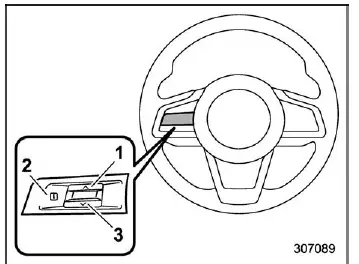
Control switches


By using
 or
or
 on the steering wheel controls, the driver of the Subaru Ascent can seamlessly switch
between different display screens and information panels.
on the steering wheel controls, the driver of the Subaru Ascent can seamlessly switch
between different display screens and information panels.
When important notifications arise, such as vehicle status updates or safety warnings, they will temporarily override the current display screen and appear with an audible alert. This ensures that critical information is not missed. When such alerts are shown in the Subaru Ascent, the driver should promptly evaluate the message and take appropriate action according to the instructions displayed.
After a short period, the warning screen will automatically revert to the previously
displayed screen. While the
 information reminder is active, the system may allow the warning message to be recalled.
To review messages marked with
information reminder is active, the system may allow the warning message to be recalled.
To review messages marked with
 ,
press the
,
press the
 switch located on the steering wheel.
Welcome screen (opening animation) and Good-bye screen (ending animation)
In the Subaru Ascent, when the driver’s door is unlocked and then opened and closed, a visually engaging welcome screen animation is displayed on the combination meter for approximately 20 seconds, enhancing the user experience and providing a premium feel.
When the ignition switch is turned to the "LOCK"/"OFF" position, the display transitions smoothly into a good-bye animation, gradually dimming until the screen turns off completely, reinforcing the refined digital interface of the Subaru Ascent.
NOTE
- The appearance and wording of the welcome and good-bye screens in the Subaru Ascent may vary depending on model specifications and software version.
- If the ignition switch is turned to the "ON" position while the welcome screen is still active, the system will immediately switch to the standard operational display.
- After being shown once, the welcome screen requires a short interval before it can be displayed again.
- If the ignition switch is activated immediately after unlocking the driver’s door, the welcome screen will not appear even if the door is opened and closed.
- The welcome screen will automatically disappear if the driver’s door is locked using the remote keyless entry system or keyless access function while it is being displayed.
- The display of the welcome animation, including integration with the audio/navigation system, can be enabled or disabled in the Subaru Ascent settings.
- Both the welcome and good-bye animations can be customized or turned off entirely according to driver preference.
Warning screen
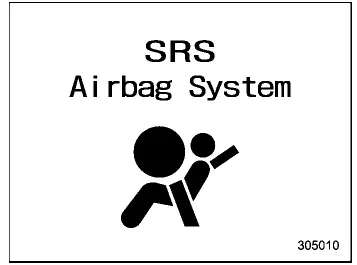
Example of warning
If a warning message or scheduled maintenance notification appears on the Subaru Ascent display, it will be shown in this dedicated warning screen. The driver should carefully read the message and take the necessary corrective actions to maintain vehicle safety and performance.
Additional note (EN): The Subaru Ascent digital display system is engineered to combine clarity, responsiveness, and safety, ensuring that drivers receive critical information without unnecessary distraction.
 Combination meter display (color LCD)
WARNING
When operating the combination meter display in your Subaru Ascent, always
remain fully focused on safe driving conditions. Interacting with the display while
the vehicle is moving can si ...
 Meter information screen
The meter information screen in the Subaru Ascent can be flexibly customized,
allowing the driver to switch between various data views depending on current driving
needs and preferences. This inte ...
Other materials:
Switching power status
1. Apply the parking brake.
2. Shift the select lever into the "P"
position.
3. Depress the brake pedal.
4. Hold the access key with the buttons
facing you, and touch the push-button
ignition switch with it.
When the communication between the
access key and the vehicle is completed ...
Dtc b1902 short in front p/t rh (to ground)
AIRBAG SYSTEM (DIAGNOSTICS) > Diagnostic Chart with Trouble CodeDTC B1902 SHORT IN FRONT P/T RH (TO GROUND)Diagnosis start condition:Ignition voltage is 10 V to 16 V.DTC detecting condition:• Seat belt pretensioner (RH) circuit is shorted to ground.• Pretensioner (RH) is faulty.• ...
File information
Compatible compressed files (Audio)
Corresponding sampling frequency (Audio)
Corresponding bit rates (Audio)
(Variable Bit Rate (VBR) compatible)
MP3 (MPEG Audio Layer 3), WMA
(Windows Media Audio) and AAC (Advanced
Audio Coding) are audio compression
standards.
This syste ...
