
Subaru Crosstrek Service Manual: Assembly
POWER ASSISTED SYSTEM (POWER STEERING) > Electric Power Steering Gearbox
ASSEMBLY
1. Install the tie-rod into rack.
Tightening torque:
90 N·m (9.18 kgf-m, 66.4 ft-lb)
NOTE:
Check the mating face of rack and tie-rod for foreign matter such as dust etc.
2. Apply a coat of grease to the tie-rod groove, and then install the boot - steering gearbox to the housing.
NOTE:
Make sure that the boot - steering gearbox is installed without unusual inflation or deflation.
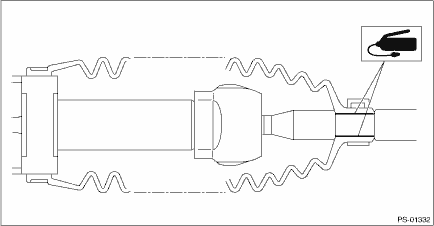
3. Using the boot clamp pliers, crimp the boot so that the clearance (b) of the band - boot (a) crimp portion becomes 2 mm (0.08 in) or less.
NOTE:
Use a new band - boot.
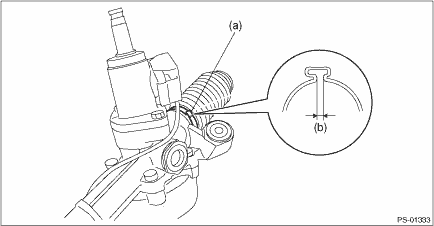
4. Fix the end of the boot - steering gearbox with clip - boot tie-rod (a).
5. After installation, check that the end of the boot - steering gearbox is installed to the groove (b) of the tie-rod.
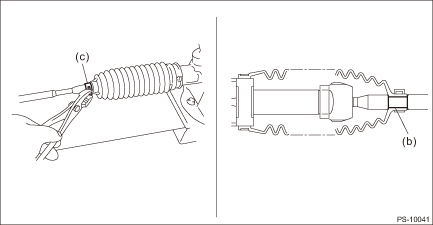
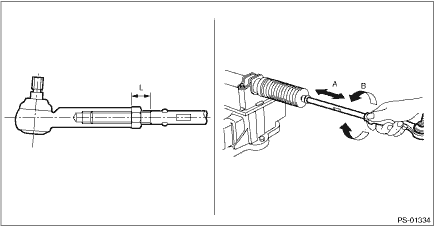
6. If the tie-rod end has been removed, screw in lock nut and tie-rod end to the threaded portion of tie-rod, and tighten the lock nut temporarily in a position as shown in the figure.
Installed tie-rod length L:
33 mm (1.3 in)
7. Inspect the steering gearbox assembly as follows:
(1) “A” Holding the tie-rod end, repeat lock to lock several times as quickly as possible.
(2) “B” Holding the tie-rod end, turn it slowly at a radius several times as large as possible.
(3) Finally, make sure that the boot - steering gearbox is installed in the specified position without inflating.
8. Remove the steering gearbox assembly from ST.
 Removal
POWER ASSISTED SYSTEM (POWER STEERING) > Electric Power Steering GearboxREMOVALCAUTION:• The power steering control module continues to operate after the engine stops and calculate the temper ...
 Disassembly
POWER ASSISTED SYSTEM (POWER STEERING) > Electric Power Steering GearboxDISASSEMBLYCAUTION:• Nut for fixing the rack is on the driver’s side only. When removing the tie-rod on the passe ...
Other materials:
Caution
MANUAL TRANSMISSION AND DIFFERENTIAL(5MT) > General DescriptionCAUTION• Remove contamination including dirt and corrosion before removal, installation or disassembly.• Keep the disassembled parts in order and protect them from dust and dirt.• Before removal, installation or disa ...
Electrical specification
AIRBAG SYSTEM (DIAGNOSTICS) > Airbag Control Module I/O SignalELECTRICAL SPECIFICATION• Terminal numbers in airbag control module connector are shown in the figure.• The airbag warning light illuminates when the connector is removed from the airbag control module.ItemControl module te ...
Removal
EXTERIOR BODY PANELS > Rear DoorREMOVAL1. REAR DOOR PANEL1. Disconnect the ground cable from battery. NOTE">2. Remove the trim panel - rear door. Door Trim > REMOVAL">3. Remove the sealing cover - rear door. Rear Sealing Cover > REMOVAL">4. Remove the cover B pill ...
