
Subaru Crosstrek Service Manual: Adjustment
CLUTCH SYSTEM > Clutch Switch
ADJUSTMENT
1. Loosen the lock nut of the clutch start switch.
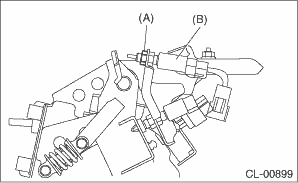
(A) | Lock nut |
(B) | Clutch start switch |
2. Disconnect the harness connector of the clutch start switch.
3. Remove the snap pin and clevis pin connecting the clutch pedal and operating rod.
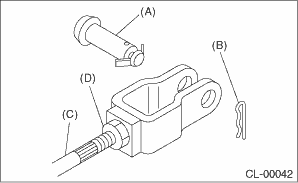
(A) | Clevis pin |
(B) | Snap pin |
(C) | Push rod |
(D) | Lock nut |
4. Adjust the clutch start switch so that the switch turns on when the clearance between clutch pedal stopper and clutch pedal is within the specification described below, and then tighten the lock nut.
Clearance A:
6.3 — 8.6 mm (0.25 — 0.34 in)
Tightening torque:
8 N·m (0.8 kgf-m, 5.9 ft-lb)
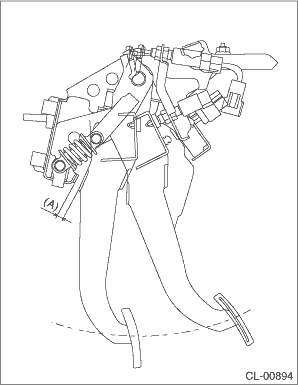
NOTE:
• Using a plate of the same thickness for the clearance facilitates the adjustment operation.
• Using the Subaru Select Monitor or a tester, check the position where the switch turns on.
Check the following figure for the terminal layout of the harness connector.
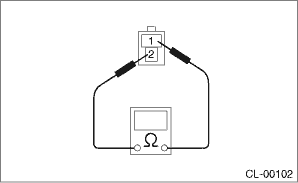
• When performing adjustment by the clearance between clutch start switch and clutch pedal plate, perform installation according to the following gap.
Clearance B:
8.6 — 9.0 mm (0.34 — 0.35 in)
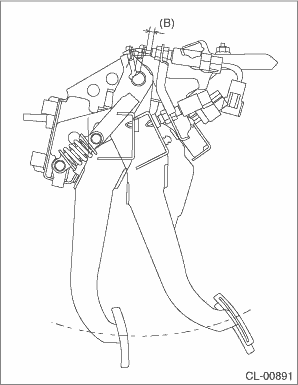
5. Connect the clutch start switch connector.
 Clutch switch
...
 Removal
CLUTCH SYSTEM > Clutch SwitchREMOVALCAUTION:Before handling the airbag system components, refer to “CAUTION” of “General Description” in “AIRBAG SYSTEM”. Genera ...
Other materials:
System servicing
WARNING
When discarding a seatbelt retractor
assembly or scrapping
the entire vehicle damaged by a
collision, consult your SUBARU
dealer.
Tampering with or disconnecting
the system's wiring could result
in accidental activation of the
seatbelt pretensioner and/or
SRS airbag or ...
Continuously variable transmission features
The continuously variable transmission (CVT) in the Subaru Ascent is an advanced
electronically managed system designed to deliver seamless acceleration, optimal
efficiency, and smooth driving dynamics. Unlike traditional gearboxes, it offers
an infinite range of forward gear ratios along with ...
Specification
FRONT SUSPENSION > General DescriptionSPECIFICATIONTire sizeP225/55R17225/55R17FrontWheel arch height452 (17.8)(Tolerance: +12 mm −24 mm (+0.47 in −0.94 in))mm (in)Camber (tolerance: ±0°45' Differences between RH and LH: 45' or less)0°10'Caster (referential valu ...
