
Subaru Crosstrek Owners Manual: Using the cover
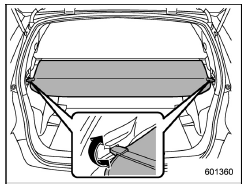
To extend the cover, pull the end of the cover out of the housing, then insert its hooks into the catches as shown. To rewind it, unhook it from the catches and it will rewind automatically. You should hold on to the cover and guide it back into the cover housing while it is rewinding.
WARNING
Do not place anything on the extended cover. Putting excessive weight on the extended cover can break it and an object on the cover could tumble forward in the event of a sudden stop or collision. This could cause serious injury.
CAUTION
Be careful not to scratch the rear gate stays while extending and rewinding the cover.
Scratches on the stays could cause leakage of gas from the stays, which may result in their inability to hold the rear gate open.
 Cargo area cover (if equipped)
The cargo area cover is provided for
covering the cargo area and to protect its
contents from direct sunlight. This cover is
detachable to make room for additional
cargo. ...
 To remove the cover housing
1. Rewind the cover.
2. Push the cover housing to the right
side and shorten it.
3. Take it off the retainer. ...
Other materials:
Dtc u0402 invalid data received from tcm
LAN SYSTEM (DIAGNOSTICS) > Diagnostic Procedure with Diagnostic Trouble Code (DTC)DTC U0402 INVALID DATA RECEIVED FROM TCMDTC detecting condition:Received error data from TCM.Trouble symptom:Sport indicator light blinks.STEPCHECKYESNO1.CHECK PERFORMING OF BASIC DIAGNOSTIC PROCEDURE.Was the basic ...
Specification
VEHICLE DYNAMICS CONTROL (VDC) > VDC Sequence ControlSPECIFICATION1. CONDITIONS FOR COMPLETION OF VDC SEQUENCE CONTROLWhen the following conditions develop, the VDC sequence control stops and VDC operation is returned to the normal control mode.• When the speed of at least one wheel reaches ...
Dtc c1221 front left abs sensor circuit
VEHICLE DYNAMICS CONTROL (VDC) (DIAGNOSTICS) > Diagnostic Procedure with Diagnostic Trouble Code (DTC)DTC C1221 FRONT LEFT ABS SENSOR CIRCUITNOTE:For the diagnostic procedure, refer to “DTC C1241 REAR LEFT ABS SENSOR CIRCUIT”. Diagnostic Procedure with Diagnostic Trouble Code (DTC) & ...
