
Subaru Crosstrek Service Manual: Replacement
DIFFERENTIALS > Rear Differential Side Oil Seal
REPLACEMENT
1. Remove the rear differential. Rear Differential (T-type) > REMOVAL"> Rear Differential (VA-type) > REMOVAL">
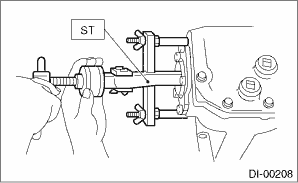
2. Remove the rear differential side oil seal using a ST or screwdriver wrapped with vinyl tape to prevent the side retainer from scratching.
| ST 398527700 | PULLER ASSY |
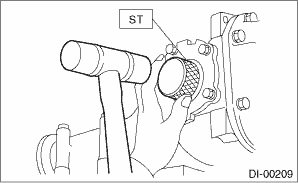
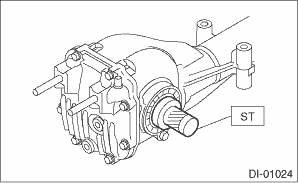
3. Using the ST, install the oil seal.
CAUTION:
Pay attention to the left and right of the oil seal.
NOTE:
• Use a new oil seal.
• Apply differential gear oil to the oil seal lips.
• T-type
| ST 398437700 | OIL SEAL INSTALLER |
• VA1-type
| ST 498447100 | INSTALLER |
4. Install the rear differential. Rear Differential (T-type) > INSTALLATION"> Rear Differential (VA-type) > INSTALLATION">
 Inspection
DIFFERENTIALS > Rear Differential Side Oil SealINSPECTIONMake sure that there is no leakage from side oil seal. If there is any leakage, replace the oil seal. ...
 Front differential assembly Note
DIFFERENTIALS > Front Differential AssemblyNOTE1. CVT MODELFor front differential for the CVT model, refer to the “CVT (TR580)” section. Front Differential Assembly">2. 5MT MOD ...
Other materials:
CHECK ENGINE warning light/Malfunction indicator light
CAUTION
If the CHECK ENGINE warning light in your Subaru Ascent turns on while driving,
it is essential to have the vehicle inspected and repaired by an authorized SUBARU
dealer as soon as possible. Continuing to operate the Subaru Ascent without addressing
potential emission control system i ...
Dtc u0401 invalid data received from ecm/pcm a
LAN SYSTEM (DIAGNOSTICS) > Diagnostic Procedure with Diagnostic Trouble Code (DTC)DTC U0401 INVALID DATA RECEIVED FROM ECM/PCM “A”DTC DETECTING CONDITION:Defective data from ECM.TROUBLE SYMPTOM:Defective data on CAN communication occurs.STEPCHECKYESNO1.CHECK PERFORMING OF BASIC DIAGNO ...
Caution
BRAKE > General DescriptionCAUTION• Wear appropriate work clothing, including a helmet, protective goggles and protective shoes when performing any work.• Before removal, installation or disassembly, be sure to clarify the failure. Avoid unnecessary removal, installation, disassembly ...
