
Subaru Crosstrek Service Manual: Removal
WIPER AND WASHER SYSTEMS > Wiper Blade
REMOVAL
1. FRONT
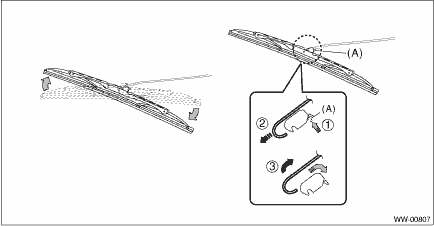
While pushing the locking clip (A) up, pull out the blade assembly - windshield wiper in the direction of the arrow, and remove it from the arm assembly - windshield wiper.
2. REAR
Turn the blade assembly - rear wiper in the direction of arrow (A) and remove it from the arm assembly - rear wiper.
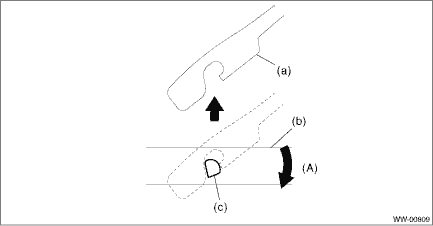
(A) | Turn the wiper blade. | ||||
(a) | Arm ASSY - rear wiper | (b) | Blade ASSY - rear wiper | (c) | Wiper blade attachment section |
 Assembly
WIPER AND WASHER SYSTEMS > Wiper BladeASSEMBLY1. FRONT1. Insert the rubber assembly - windshield wiper onto the blade - windshield wiper so that the stopper is in the position shown in the figure.2 ...
 Disassembly
WIPER AND WASHER SYSTEMS > Wiper BladeDISASSEMBLY1. FRONTPull the side (a) of the wiper rubber stopper, and remove the rubber assembly - windshield wiper from the blade assembly - windshield wiper. ...
Other materials:
Removal
SECURITY AND LOCKS > Keyless Entry Control ModuleREMOVAL1. Disconnect the ground cable from battery. NOTE">2. Remove the trim panel - rear apron LH. Rear Quarter Trim > REMOVAL">3. Remove the keyless entry control module.(1) Disconnect the connector.(2) Remove the bolt and th ...
Dtc p0197 engine oil temperature sensor "a" circuit low
ENGINE (DIAGNOSTICS)(H4DO) > Diagnostic Procedure with Diagnostic Trouble Code (DTC)DTC P0197 ENGINE OIL TEMPERATURE SENSOR "A" CIRCUIT LOWDTC detecting condition:Immediately at fault recognitionTrouble symptom:• Hard to start• Improper idling• Poor driving performance ...
Windshield washer
To wash the windshield, pull the wiper
control lever toward you. The washer fluid
sprays until you release the lever. The
wipers operate while you pull the lever.
NOTE
Windshield washer fluid warning light (type A)
Windshield washer fluid warning light (type B)
The windshield wash ...
