
Subaru Crosstrek Service Manual: Removal
SECURITY AND LOCKS > Keyless Access Outdoor Antenna
REMOVAL
1. FRONT ANTENNA
CAUTION:
Do not remove the antenna from the front door outer handle.
If replacement is needed, replace the front outer handle assembly as a set.
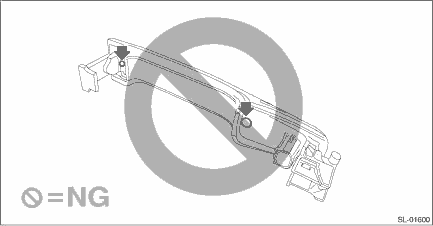
Remove the handle - door outer. Front Outer Handle > REMOVAL">
2. REAR ANTENNA
CAUTION:
• Do not detach the antenna except when replacing it. Detaching unnecessarily will lead to insecure attachment of the antenna.
• When replacing the antenna, do not reuse the tapping screw. Always replace with new tapping screws.
1. Disconnect the ground cable from battery. NOTE">
2. Remove the bumper face - rear. Rear Bumper > REMOVAL">
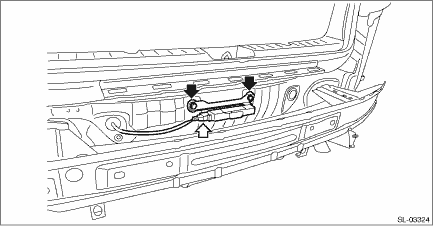
3. Remove the rear antenna assembly - exterior.
(1) Disconnect the connector.
(2) Remove the screws, and remove the rear antenna assembly - exterior.
 Inspection
SECURITY AND LOCKS > Keyless Access Outdoor AntennaINSPECTION1. Check the setting by performing Keyless access system check using the Subaru Select Monitor. Keyless Access System Check > OPERAT ...
 Installation
SECURITY AND LOCKS > Keyless Access Outdoor AntennaINSTALLATIONInstall each part in the reverse order of removal.Tightening torque:Rear antenna assembly - exterior: 1.5 N·m (0.2 kgf-m, 1.1 f ...
Other materials:
Removal
FUEL INJECTION (FUEL SYSTEMS)(H4DO) > Crankshaft Position Sensor PlateREMOVALThe crankshaft position sensor plate is tightened together with the drive plate or flywheel; therefore, refer to “Drive Plate” or “Flywheel” for removal procedure. Drive Plate > REMOVAL"& ...
Installation
MECHANICAL(H4DO) > Chain CoverINSTALLATION1. Install the O-rings to cylinder head RH, cylinder head LH, cylinder block LH and oil pan upper.NOTE:• Use new O-rings.• Apply a coat of engine oil to the O-rings.2. Apply liquid gasket if there are gaps between front camshaft cap and cam ca ...
Read current data Operation
EyeSight (DIAGNOSTICS) > Read Current DataOPERATION1. STEREO CAMERA1. On «Start» display, select «Diagnosis».2. On «Vehicle selection» display, input the target vehicle information and select «Confirmed».3. On «Main Menu» display, select «Each System».4. On «Select System» display, ...
