
Subaru Crosstrek Service Manual: Removal
SECURITY AND LOCKS > Immobilizer Antenna
REMOVAL
1. MODEL WITHOUT KEYLESS ACCESS WITH PUSH BUTTON START
1. Disconnect the ground cable from battery. NOTE">
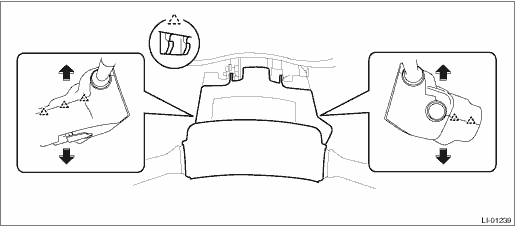
2. Remove the cover assembly - column.
(1) Remove the screws by turning the steering wheel to right and left.
(2) Release the claw, and remove the cover assembly - column UPR and the cover assembly - column LWR.
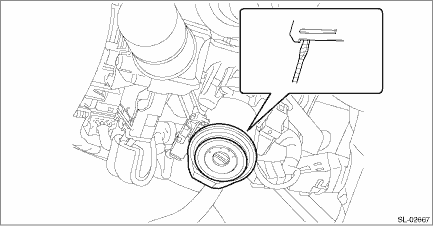
3. Remove the immobilizer antenna assembly.
(1) Disconnect the connector.
(2) Release two claws using a flat tip screwdriver or similar tool wrapped with a protection tape, and remove the immobilizer antenna assembly.
CAUTION:
Do not apply excessive force to disengage the lock of immobilizer antenna assembly. Otherwise they may be broken because those parts are the products made of a plastic.
2. MODEL WITH KEYLESS ACCESS WITH PUSH BUTTON START
NOTE:
Immobilizer antenna is integrated with the push button ignition switch.
1. Remove the cover assembly - instrument panel LWR driver. Instrument Panel Lower Cover > REMOVAL">
2. Remove the push button ignition switch.
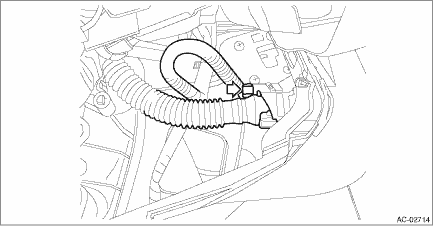
(1) Disconnect the connector, and remove the aspirator hose.
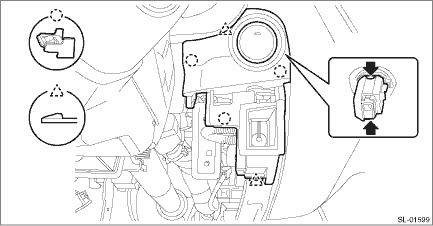
(2) Release the claws, and then remove the panel - switch.
(3) Release the claws, and then remove the push button ignition switch from the panel - switch.
 Installation
SECURITY AND LOCKS > Immobilizer AntennaINSTALLATIONInstall each part in the reverse order of removal. ...
 Impact sensor
...
Other materials:
Removal
HVAC SYSTEM (HEATER, VENTILATOR AND A/C) > Expansion ValveREMOVAL1. Disconnect the ground cable from battery. NOTE">2. Using the refrigerant recovery system, discharge refrigerant. Refrigerant Recovery Procedure > PROCEDURE">3. Remove the air intake boot. Air Intake Boot > ...
Dtc b1430 in-vehicle (post evaporator) temperature sensor circuit open
HVAC SYSTEM (AUTO A/C) (DIAGNOSTICS) > Diagnostic Procedure with Diagnostic Trouble Code (DTC)DTC B1430 IN-VEHICLE (POST EVAPORATOR) TEMPERATURE SENSOR CIRCUIT OPENDTC detecting condition:In-vehicle sensor circuit is open.Trouble symptom:In-vehicle air temperature is falsely recognized as 25& ...
Dtc c0035 rr hold valve malfunction
VEHICLE DYNAMICS CONTROL (VDC) (DIAGNOSTICS) > Diagnostic Procedure with Diagnostic Trouble Code (DTC)DTC C0035 RR HOLD VALVE MALFUNCTIONNOTE:For the diagnostic procedure, refer to “C0064 NORMAL CLOSING VALVE 2 MALFUNCTION”. Diagnostic Procedure with Diagnostic Trouble Code (DTC) > ...
