
Subaru Crosstrek Service Manual: Removal
PARKING BRAKE > Parking Brake Assembly (Rear Disc Brake)
REMOVAL
1. Release the parking brake.
2. Lift up the vehicle, and then remove the rear wheels.
3. Remove the rear disc rotor. Rear Disc Rotor > REMOVAL">
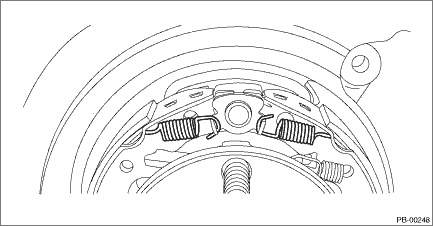
4. Remove the spring - primary shoe return and the spring - secondary shoe return.
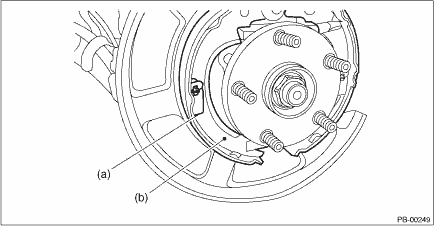
5. Remove the parking brake shoe on the primary side.
(1) Remove the cup - shoe hold-down (a) and the spring - adjuster, and remove the parking brake shoe (b).
(2) Remove the strut - brake and the spring - strut.
(3) Remove the adjuster assembly - rear brake.
6. Remove the parking brake shoe on the secondary side.
(1) Rotate the cup - shoe hold-down in the direction of the front side of the vehicle.
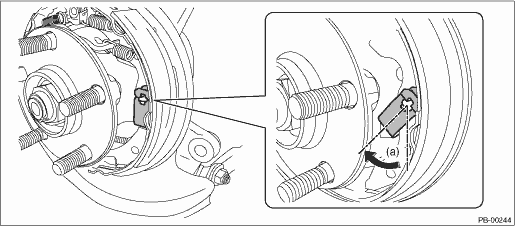
(a) | Approx. 45° |
(2) Press and shorten the cup - shoe hold-down.
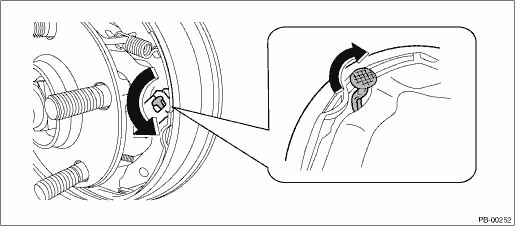
(3) Rotate the pin - secondary shoe hold-down in the opposite direction, and pull out the pin - shoe hold-down.
7. Remove the cable assembly - hand brake cable (a) from the parking lever - rear (b).
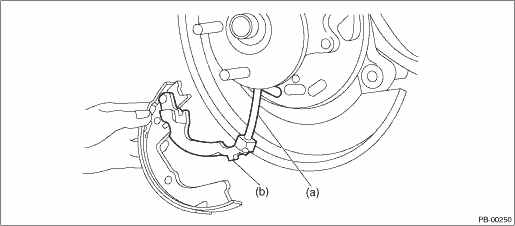
8. Remove the retainer - rear brake from the secondary side parking brake shoe. Remove the parking lever - rear from the brake shoe.
 Adjustment
PARKING BRAKE > Parking Brake Assembly (Rear Disc Brake)ADJUSTMENT1. SHOE CLEARANCE1. Return the lever assembly - hand brake completely.2. Loosen the adjusting nut, and make the cable free.3. Remov ...

Other materials:
Dtc p2271 o2 sensor signal biased/stuck rich bank 1 sensor 2
ENGINE (DIAGNOSTICS)(H4DO) > Diagnostic Procedure with Diagnostic Trouble Code (DTC)DTC P2271 O2 SENSOR SIGNAL BIASED/STUCK RICH BANK 1 SENSOR 2DTC detecting condition:Detected when two consecutive driving cycles with fault occur.CAUTION:After servicing or replacing faulty parts, perform Clear Me ...
Operation
TELEMATICS SYSTEM (DIAGNOSTICS) > Diagnostic Code(s) DisplayOPERATION1. On «Start» display, select «Diagnosis».2. On «Vehicle selection» display, input the target vehicle information and select «Confirmed».3. On «Main Menu» display, select «Each System».4. On «Select System» display ...
Inspection
VEHICLE DYNAMICS CONTROL (VDC) (DIAGNOSTICS) > Warning Light Illumination PatternINSPECTION(1)Ignition switch(6)Light OFF(11)2 seconds or more(2)OFF(7)Light ON(12)Brake warning light (EBD warning light)(3)ON(8)2 seconds(13)Parking brake(4)Engine start(9)VDC OFF indicator light(14)Released(5)ABS w ...
