
Subaru Crosstrek Service Manual: Removal
EXTERIOR/INTERIOR TRIM > Rear Bumper
REMOVAL
1. CROSSTREK MODEL
1. Disconnect the ground cable from battery. NOTE">
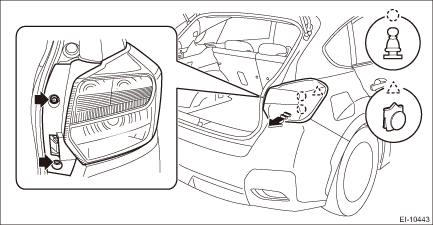
2. Remove the light assembly - rear combination.
CAUTION:
Be careful not to damage the clips.
(1) Release the bolts and clips, then pull out the light assembly - rear combination to the vehicle rear.
(2) Disconnect the connector and remove the light assembly - rear combination.
3. Remove the bumper face - rear.
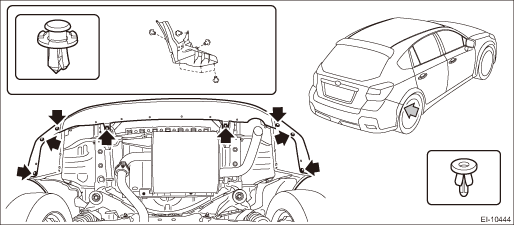
(1) Remove the clips inside the wheel housing.
(2) Remove the clips at the lower side of the bumper face - rear.
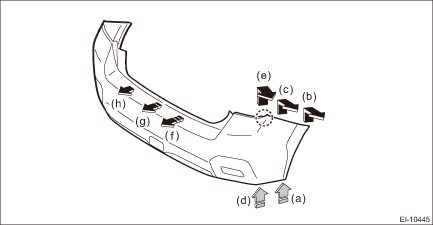
(3) Detach (b) and (c) while pulling up (a) of the bumper face - rear.
(4) Detach (e) while pulling up (d) of the bumper face - rear.
(5) Detach the opposite side in the same manner.
(6) Detach in order from (f) to (h) while pulling up the center part of the bumper face - rear.
CAUTION:
Do not pull forcibly. It may damage the flange section on the bumper face - rear side when it comes off from the claws of the bracket - rear bumper.
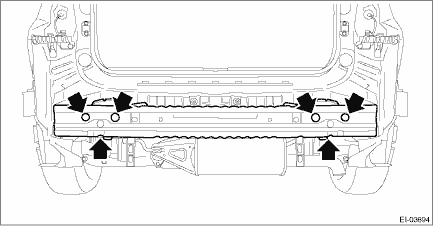
4. Remove the bolts and nuts, and remove the bumper beam COMPL - rear.
NOTE:
After all nuts are removed, raise the bumper beam COMPL - rear a little to remove it from vehicle body.
5. Remove bumper brackets.
(1) Remove the screws.
(2) Turn over the trim panel - rear apron, and detach the claw of the clip from the back side.
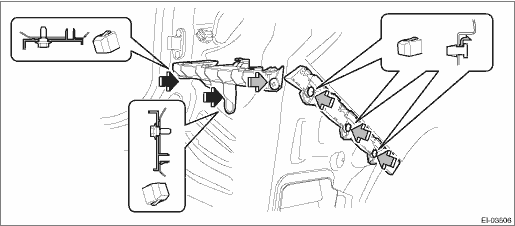
(3) Remove the clip, and remove the bracket - rear bumper lower.
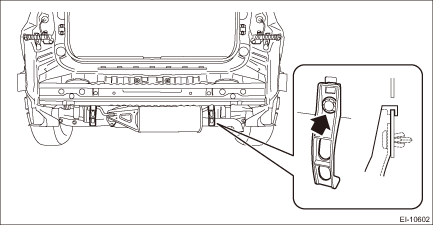
6. From behind the bumper, release the claws, and remove the reflex reflector assembly.
 Repair
EXTERIOR/INTERIOR TRIM > Rear BumperREPAIRRefer to the description concerning repair in “Front Bumper” section. Front Bumper > REPAIR"> ...

Other materials:
Dtc p0747 pressure control solenoid "a" stuck on
CONTINUOUSLY VARIABLE TRANSMISSION (DIAGNOSTICS) > Diagnostic Procedure with Diagnostic Trouble Code (DTC)DTC P0747 PRESSURE CONTROL SOLENOID "A" STUCK ONDTC detecting condition:Detected when two consecutive driving cycles with fault occur.Trouble symptom:• Acceleration is poor du ...
Inspection
COMMUNICATION SYSTEM > Relay and FuseINSPECTION1. CHECK FUSE1. Remove the fuse and check visually.2. If the fuse is blown out, replace the fuse.2. CHECK RELAY1. Check the resistance between relay terminals.Terminal No.Inspection conditionsSpecificationCircuit1 — 2Always1 M? or more1 — 2Apply ...
Adjustment
COOLING(H4DO) > Engine CoolantADJUSTMENT1. PROCEDURE TO ADJUST THE SUBARU SUPER COOLANT CONCENTRATIONCAUTION:Use the SUBARU Super Coolant with a 50 — 60% concentration in order to obtain maximum anti-freeze and anti-rust performance.To adjust the concentration of SUBARU Super Coolant according ...
