
Subaru Crosstrek Service Manual: Removal
ENTERTAINMENT > GPS Antenna
REMOVAL
CAUTION:
Before handling the airbag system components, always refer to “CAUTION” of “General Description” in “AIRBAG SYSTEM”.
1. Disconnect the ground cable from battery and wait for at least 60 seconds before starting work. NOTE">
2. Remove the cover assembly - instrument panel LWR driver and the knee airbag module. Knee Airbag Module > REMOVAL">
3. Remove the glove box. Glove Box > REMOVAL">
4. Remove the center grille assembly. Air Vent Grille > REMOVAL">
5. Remove the audio assembly or navigation assembly. Audio > REMOVAL">
6. Remove the combination meter assembly. Combination Meter > REMOVAL">
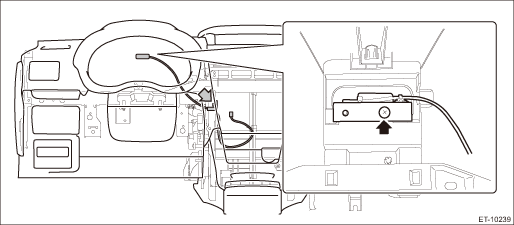
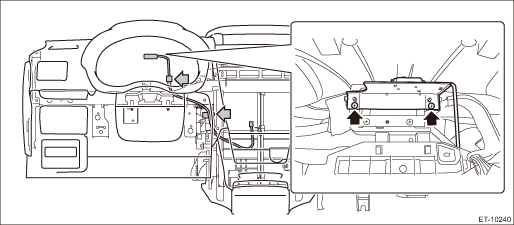
7. Remove the GPS antenna assembly.
(1) Tie a string to the GPS antenna assembly harness connector on the navigation unit side.
NOTE:
• A string makes operation easier during installation.
• For the model with telematics, also tie a string to the connector on the data communication module side.
(2) Remove the screw and harness clamp, and pull out the GPS antenna assembly harness from the combination meter side.
• Model without telematics
• Model with telematics
(3) When the GPS antenna assembly is pulled out, remove the string attached to the connector in step (1).
 Installation
ENTERTAINMENT > GPS AntennaINSTALLATIONCAUTION:• After installing the center grille assembly, check that the air vent grille of the center grille assembly is inserted correctly into the air v ...

Other materials:
Brake system warning light (red)
The
light illuminates with the parking
brake applied while the ignition switch is
in the "ON" position. It turns off when the
parking brake is fully released.
WARNING
Driving with the brake system
warning light on is dangerous.
This indicates your brake system
may not be working ...
All-Wheel Drive warning light (CVT models)
This
light blinks if the vehicle is driven with
tires of differing diameters fitted on the
wheels or with an excessively low air
pressure in any of the tires.
WARNING
If the AWD warning light flashes,
promptly park in a safe location then
check whether all four tires are the
same diamete ...
Caution
EyeSight (DIAGNOSTICS) > General DescriptionCAUTION1. AIRBAG SYSTEMAirbag system wiring harness is routed near the cruise control command switch.CAUTION:• Do not use the electrical test equipment on the airbag system wiring harnesses and connector circuits.• Be careful not to damage t ...
