
Subaru Crosstrek Service Manual: Removal
ENTERTAINMENT > Data Communication Module
REMOVAL
1. DATA COMMUNICATION MODULE
CAUTION:
Before handling the airbag system components, always refer to “CAUTION” of “General Description” in “AIRBAG SYSTEM”.
1. Disconnect the ground cable from battery and wait for at least 60 seconds before starting work. NOTE">
2. Remove the cover assembly - instrument panel LWR driver and the knee airbag module. Knee Airbag Module > REMOVAL">
3. Remove the glove box. Glove Box > REMOVAL">
4. Remove the center grille assembly. Air Vent Grille > REMOVAL">
5. Remove the audio assembly or navigation assembly. Audio > REMOVAL">
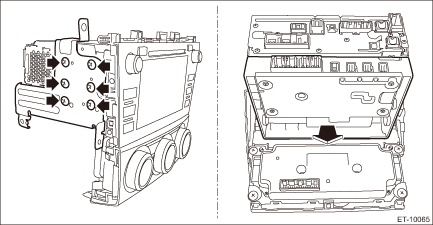
6. Remove the data communication module.
(1) Remove the screws.
(2) Remove the audio bracket or navigation bracket, and then remove the data communication module.
CAUTION:
Do not drop or apply any impact to the data communication module.
2. BACKUP BATTERY
CAUTION:
Before handling the airbag system components, always refer to “CAUTION” of “General Description” in “AIRBAG SYSTEM”.
1. Disconnect the ground cable from battery and wait for at least 60 seconds before starting work. NOTE">
2. Remove the data communication module. Data Communication Module > REMOVAL">
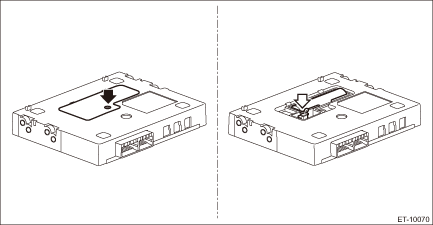
3. Remove the backup battery.
(1) Remove the screws, and then remove the battery cover.
Preparation tool:
TORX® T10
(2) Disconnect the connector and remove the backup battery.
 Inspection
ENTERTAINMENT > Data Communication ModuleINSPECTION1. BACKUP BATTERY1. Measure the voltage between connector terminals.Preparation tool:Circuit testerTerminal No.Standard1 (+) — 2 (−)2 V or ...
 Installation
ENTERTAINMENT > Data Communication ModuleINSTALLATION1. DATA COMMUNICATION MODULECAUTION:• After installing the center grille assembly, check that the air vent grille of the center grille ass ...
Other materials:
Removal
EXTERIOR BODY PANELS > Front DoorREMOVAL1. FRONT DOOR PANEL1. Disconnect the ground cable from battery and wait for at least 60 seconds before starting work. NOTE">2. Remove the trim panel - front door. Door Trim > REMOVAL">3. Remove the sealing cover - front door. Front Sea ...
Diagnostics chart for security indicator light Inspection
IMMOBILIZER (DIAGNOSTICS) > Diagnostics Chart for Security Indicator LightINSPECTION1. CHECK SECURITY INDICATOR LIGHT CIRCUITCAUTION:When the body integrated unit is replaced, registration of the immobilizer system is required. For details, refer to the “REGISTRATION MANUAL FOR IMMOBILIZER& ...
Removal
CONTINUOUSLY VARIABLE TRANSMISSION(TR580) > Automatic Transmission AssemblyREMOVAL1. Disconnect the ground cable from battery. NOTE">NOTE:For model with battery sensor, disconnect the ground terminal from battery sensor.2. Remove the clip (A) from the air intake boot.3. Loosen the clamp ...
