
Subaru Crosstrek Service Manual: Installation
ENTERTAINMENT > Data Communication Module
INSTALLATION
1. DATA COMMUNICATION MODULE
CAUTION:
• After installing the center grille assembly, check that the air vent grille of the center grille assembly is inserted correctly into the air vent duct.
• Before handling the airbag system components, always refer to “CAUTION” of “General Description” in “AIRBAG SYSTEM”.
1. Install each part in the reverse order of removal.
NOTE:
Align the positioning pin (a) of the data communication module with the positioning hole of the audio assembly or navigation assembly.
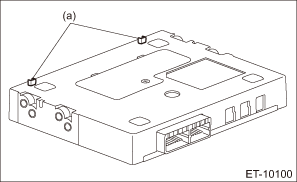
2. Perform the registration if the data communication module is replaced with a new part. Telematics System > OPERATION">
3. Check LED lighting status of overhead console or stereo camera cover assembly. Check List for Interview > CHECK">
2. BACKUP BATTERY
CAUTION:
• After installing the center grille assembly, check that the air vent grille of the center grille assembly is inserted correctly into the air vent duct.
• Before handling the airbag system components, always refer to “CAUTION” of “General Description” in “AIRBAG SYSTEM”.
Install each part in the reverse order of removal.
Tightening torque:
Battery cover: 0.3 N·m (0.03 kgf-m, 0.2 ft-lb)
 Removal
ENTERTAINMENT > Data Communication ModuleREMOVAL1. DATA COMMUNICATION MODULECAUTION:Before handling the airbag system components, always refer to “CAUTION” of “General Description ...

Other materials:
AUX
WARNING
Do not operate the player's controls
or connect the portable audio device
while driving. Doing so may result in
loss of control of your vehicle and
cause an accident or serious injury.
CAUTION
Do not leave portable audio device
in the vehicle. The temperature
inside the vehicle ...
Inspection
CLUTCH SYSTEM > Release Bearing and LeverINSPECTION1. RELEASE BEARINGCAUTION:Since this bearing is grease-sealed and is a non-lubrication type, do not wash with gasoline or any other solvent when servicing the clutch.1. Check the bearing for smooth movement by applying force to the bearing in the ...
Assembly
CONTINUOUSLY VARIABLE TRANSMISSION(TR580) > Drive Pinion Shaft AssemblyASSEMBLY1. Install the plug to drive pinion retainer.NOTE:• Use new O-rings.• Apply CVTF to the O-rings.Tightening torque:22 N·m (2.2 kgf-m, 16.2 ft-lb)2. Using the ST, install the oil seal to drive pinion r ...
