
Subaru Crosstrek Owners Manual: Models with "keyless access with push-button start system"
NOTE
For more details, refer to the Owner's Manual supplement for the remote engine start system.
Access key
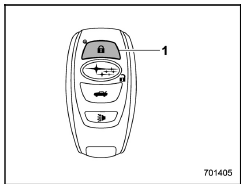
- Lock button
An access key can be used as the remote engine start transmitter. Operate the lock button to start or stop the engine as follows.
Before starting the engine
Before using the remote engine start system to start the engine, confirm the following conditions.
- The select lever is in the "P" position.
- All doors including the rear gate are closed.
- The engine hood is closed.
- The push-button ignition switch is in the "OFF" position.
 Remote engine start system (dealer
option)
Remote engine start system (dealer
option)
WARNING
There are some general precautions
when starting the engine.
Carefully read the precautions
described in "General precautions
when starting/stopping engine"
F7-9.
Do not remote ...
 When starting the engine
To start the engine with remote engine
start system, briefly press the lock button
twice within 2 seconds, then press and
hold the lock button for 3 seconds.
1. Press the lock button briefly. Th ...
Other materials:
Dtc u0140 lost communication with body control module
CONTINUOUSLY VARIABLE TRANSMISSION (DIAGNOSTICS) > Diagnostic Procedure with Diagnostic Trouble Code (DTC)DTC U0140 LOST COMMUNICATION WITH BODY CONTROL MODULENOTE:Refer to “LAN SYSTEM (DIAGNOSTICS)” for diagnostic procedures. Basic Diagnostic Procedure">1. OUTLINE OF DIAGNOS ...
Terms
Packet write
This is a general term that describes
the process of writing data on-demand to
CD-R, etc., in the same way that data is
written to floppy or hard discs.
ID3 tag
This is a method of embedding trackrelated
information in an MP3 file. This
embedded information can incl ...
Rear seat reminder
The Subaru Ascent is equipped with a rear seat reminder system designed to help
drivers check for passengers or items left in the rear seats before exiting the
vehicle.
This feature is activated when the rear doors of the Subaru Ascent are opened
and closed prior to driving.
When the ignitio ...
