
Subaru Crosstrek Service Manual: Installation
POWER ASSISTED SYSTEM (POWER STEERING) > Universal Joint
INSTALLATION
1. Before installation, check the universal joint assembly - steering. Universal Joint > INSPECTION">
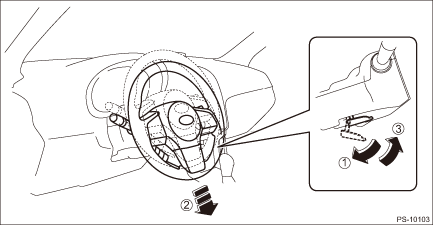
2. Adjust the tilt position of the column assembly - steering to the neutral position and lock the tilt lever.
3. Align the cutout portion (a) at serrated section of the column shaft (c) and yoke (b), then install the universal joint assembly - steering into column shaft.
CAUTION:
Be sure to align the protrusion section (a) of the column shaft side with the cutout (a) of the serration. If another cutout portions (d) are used for alignment, the bolt of the universal joint assembly - steering cannot be assembled.
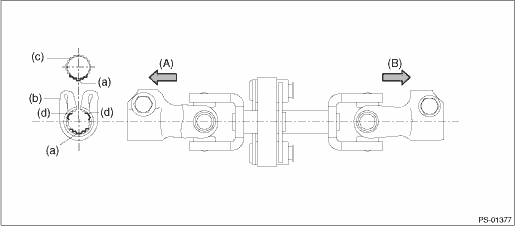
(A) | Column shaft side | (B) | Gearbox side |
4. Install the universal joint assembly - steering to the serrations of the gearbox assembly by matching the alignment marks.
5. Tighten the bolts on the gearbox side first, and then the column shaft side.
CAUTION:
Be sure to follow the tightening order and tightening torque of the universal joint assembly - steering to avoid the steering effort from becoming heavy.
Tightening torque:
24 N·m (2.45 kgf-m, 17.7 ft-lb)
Clearance:
Universal joint assembly - steering coupling to adjacent parts: 15 mm (0.59 in) or more
 Removal
POWER ASSISTED SYSTEM (POWER STEERING) > Universal JointREMOVAL1. Adjust the tilt position of the column assembly - steering to the lowest position and lock the tilt lever.2. Remove the universal j ...
 General diagnostic table Inspection
POWER ASSISTED SYSTEM (POWER STEERING) > General Diagnostic TableINSPECTIONTroublePossible causeCorrective action• Steering effort is heavy in all ranges.• Steering effort is heavy at s ...
Other materials:
Specification
HVAC SYSTEM (HEATER, VENTILATOR AND A/C) > General DescriptionSPECIFICATION1. HEATER SYSTEMItemSpecificationsConditionHeating capacity5.0 kW (4,299 kcal/h, 17,059 BTU/h) or more• Air flow control dial or switch: FOOT• Temperature control dial: HI (MAX HOT)• Temperature differenc ...
A/c filter Replacement
HVAC SYSTEM (HEATER, VENTILATOR AND A/C) > A/C FilterREPLACEMENT1. Remove the pocket assembly.(1) Attach the protective tape (a) to the panel center LWR.(2) Remove the damper COMPL - pocket.(3) Release the stoppers and remove the pocket assembly by pulling it toward you.2. Pinch the tabs to relea ...
Caution
CONTINUOUSLY VARIABLE TRANSMISSION (DIAGNOSTICS) > General DescriptionCAUTION1. The airbag system wiring harness is routed near the TCM.CAUTION:• All the airbag system wiring harnesses and connectors are colored yellow. Do not use an electric test equipment to check these circuits.• B ...
