
Subaru Crosstrek Service Manual: Installation
CONTINUOUSLY VARIABLE TRANSMISSION(TR580) > Transmission Control Device
INSTALLATION
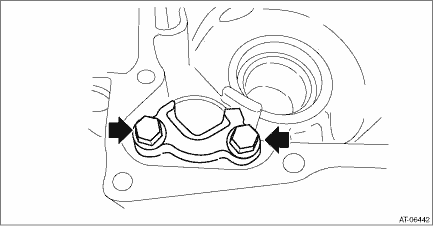
1. Install the parking support.
Tightening torque:
25 N·m (2.5 kgf-m, 18.4 ft-lb)
2. Install the extension case. Extension Case > INSTALLATION">
3. Install the manual valve.
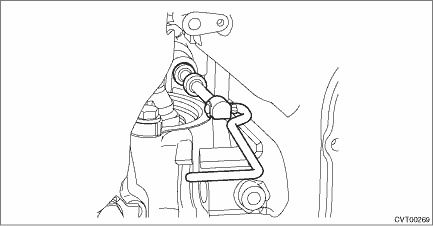
4. Install the parking rod to the manual plate.
5. Insert the parking rod into the transmission case, and install the shift connecting rod of the manual valve to the manual plate.
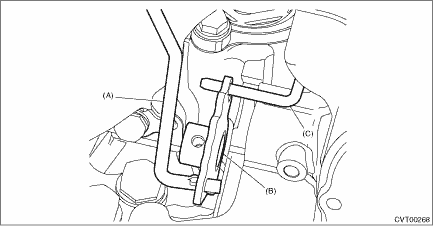
(A) | Parking rod |
(B) | Manual plate |
(C) | Shift connecting rod |
6. Insert the shifter arm shaft to the transmission assembly, install the manual plate to the shifter arm shaft, and secure the shifter arm shaft with a bolt.
NOTE:
Do not damage the lip of oil seal press-fitted in the case.
Tightening torque:
7 N·m (0.7 kgf-m, 5.2 ft-lb)
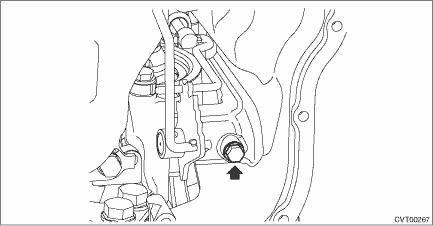
7. Install the detent spring.
Tightening torque:
7 N·m (0.7 kgf-m, 5.2 ft-lb)
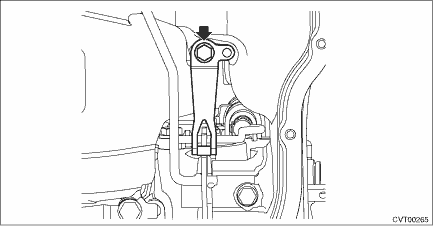
8. Install the spring pin.
NOTE:
Use new spring pin.
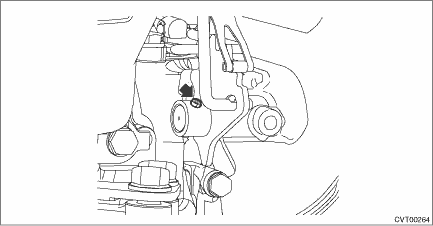
9. Install the inhibitor switch. Inhibitor Switch > INSTALLATION">
10. Adjust the inhibitor switch. Inhibitor Switch > ADJUSTMENT">
11. Install the oil strainer and oil pan. Oil Pan and Strainer > INSTALLATION">
12. Install the transmission assembly to the vehicle. Automatic Transmission Assembly > INSTALLATION">
 Removal
CONTINUOUSLY VARIABLE TRANSMISSION(TR580) > Transmission Control DeviceREMOVAL1. Remove the transmission assembly from the vehicle. Automatic Transmission Assembly > REMOVAL">2. Remove ...

Other materials:
Inspection
LIGHTING SYSTEM > Room LightINSPECTION1. ROOM LIGHT BULB1. Visually check the bulb for blow out.2. Check the bulb specification. General Description > SPECIFICATION">3. Replace the bulb if it is found defective.2. ROOM LIGHT SWITCH1. Check the resistance between switch terminals.Prepa ...
Installation
SECURITY AND LOCKS > Starter Cut RelayINSTALLATIONCAUTION:Before handling the airbag system components, refer to “CAUTION” of “General Description” in “AIRBAG SYSTEM”. General Description > CAUTION">Install each part in the reverse order of removal. ...
Birthday setting
1. Perform the preparation steps according
to "Preparation for date setting" 3-
56.
2. Operate the "
" or "
" switch to
select the "Birthday" item. Then push the
button.
3. Select an entry in the list to set by
operating the "
" or "
" switch. Then
push the
...
