
Subaru Crosstrek Service Manual: Inspection
WIPER AND WASHER SYSTEMS > Front Wiper Motor and Link
INSPECTION
1. Check that the following operations perform normally.
CAUTION:
Fix the motor to prevent the motor from being shorted by moving during operation.
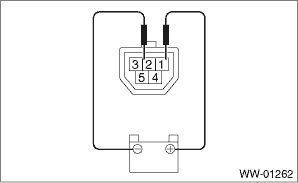
(1) When the battery is connected to the terminal of connectors, confirm that the motor operates at low speed.
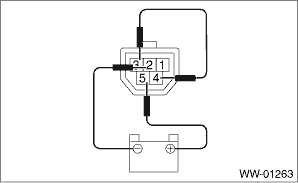
(2) When the battery is connected to the terminal of connectors, confirm that the motor operates at high speed.
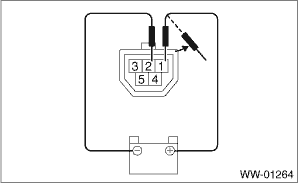
(3) Connect the battery to terminals of the connector, and remove the terminal connection with motor rotating at low speed, and stop the motor assembly - windshield wiper in mid-operation.
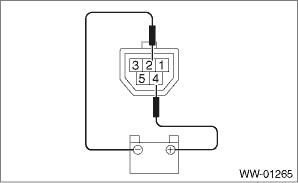
(4) Connect the battery and check that the motor stops at the automatic stop position after the motor operates at low speed again.
NOTE:
Replace the motor assembly - windshield wiper if the inspection result is not within the standard.
2. Install the motor assembly - windshield wiper. Front Wiper Motor and Link > INSTALLATION">

 Removal
WIPER AND WASHER SYSTEMS > Front Wiper Motor and LinkREMOVAL1. Disconnect the ground cable from battery. NOTE">2. Remove the arm assembly - windshield wiper. Front Wiper Arm > REMOVAL& ...
Other materials:
Dtc u0122 lost communication with vehicle dynamics control module
HVAC SYSTEM (AUTO A/C) (DIAGNOSTICS) > Diagnostic Procedure with Diagnostic Trouble Code (DTC)DTC U0122 LOST COMMUNICATION WITH VEHICLE DYNAMICS CONTROL MODULEDetected when CAN data from VDC does not arrive.NOTE:Perform the diagnosis for LAN system. Basic Diagnostic Procedure > PROCEDURE" ...
Installation
AIRBAG SYSTEM > Passenger’s Airbag ModuleINSTALLATIONCAUTION:• Before handling the airbag system components, refer to “CAUTION” of “General Description” in “AIRBAG SYSTEM”. General Description > CAUTION">• Do not allow harness and ...
Dtc p0601 internal control module memory checksum error
CONTINUOUSLY VARIABLE TRANSMISSION (DIAGNOSTICS) > Diagnostic Procedure with Diagnostic Trouble Code (DTC)DTC P0601 INTERNAL CONTROL MODULE MEMORY CHECKSUM ERRORDTC DETECTING CONDITION:Detected when two consecutive driving cycles with fault occur.TROUBLE SYMPTOM:TCM ROM malfunctionSTEPCHECKYESNO1 ...
