
Subaru Crosstrek Service Manual: Inspection
PARKING BRAKE > Parking Brake Lever
INSPECTION
1. LEVER ASSY
1. Operate the lever assembly - hand brake 3 to 4 times and fully return the lever assembly - hand brake.
2. While slowly pulling up the lever assembly - hand brake, count the notches.
Lever stroke:
7 to 8 notches when pulled with a force of 200 N (20.4 kgf, 45 lbf)
If it is not within the specified value, adjust the parking brake. Parking Brake Assembly (Rear Disc Brake) > ADJUSTMENT">
2. SWITCH ASSEMBLY
1. Measure the resistance between the switch assembly - hand brake and chassis ground.
Preparation tool:
Circuit tester
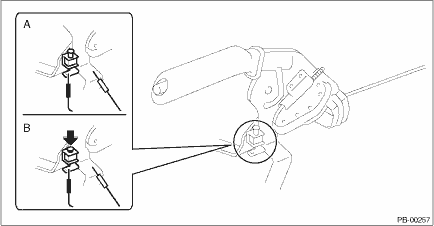
Switch position | Standard | |
A | When shaft is free (ON) | Less than 1 ? |
B | When shaft is pressed in (OFF) | 10 k? or more |
If it is not within the specified value, replace the switch assembly - hand brake.

 Installation
PARKING BRAKE > Parking Brake LeverINSTALLATION1. Install each part in the reverse order of removal.CAUTION:• The front seat mounting bolts differ between the front mounting points and the re ...
Other materials:
Removal
CONTINUOUSLY VARIABLE TRANSMISSION(TR580) > Control Valve BodyREMOVALCAUTION:• Directly after the vehicle has been running or the engine has been idling for a long time, the CVTF is hot. Be careful not to burn yourself.• Be careful not to spill CVTF on the exhaust pipe to prevent it f ...
How to contact the vehicle manufacturer concerning modifications for persons
with disabilities that may affect the advanced airbag system
Any modifications to the Subaru Ascent—especially those involving seats, seatbelts,
front structure, steering components, suspension, or floor panels—may directly impact
the operation of the advanced airbag system. This is particularly important when
adapting the vehicle for drivers or pas ...
Removal
FUEL INJECTION (FUEL SYSTEMS)(H4DO) > Rear Oxygen SensorREMOVAL1. Disconnect the ground cable from battery.2. Lift up the vehicle.3. Remove the under cover. Front Under Cover > REMOVAL">4. Disconnect the rear oxygen sensor connector.(A)Front oxygen (A/F) sensor connector(B)Rear oxygen ...
