
Subaru Crosstrek Service Manual: Electrical specification
SECURITY AND LOCKS > Keyless Entry System
ELECTRICAL SPECIFICATION
1. KEYLESS ENTRY CONTROL MODULE
• Model without tire pressure monitoring system
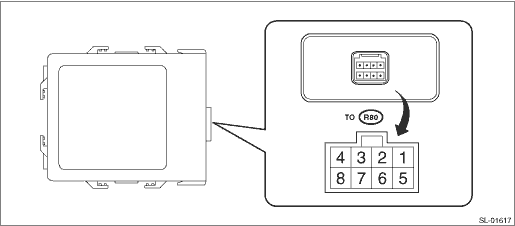
Terminal No. | Item | Measuring condition | Standard |
3 (U-ART com.) | — | Cannot be measured | — |
4 (+B) ←> Chassis ground | Voltage | Always | 10 — 14 V |
7 (GND) ←> Chassis ground | Resistance | Always | Less than 1 ? |
• Model with tire pressure monitoring system
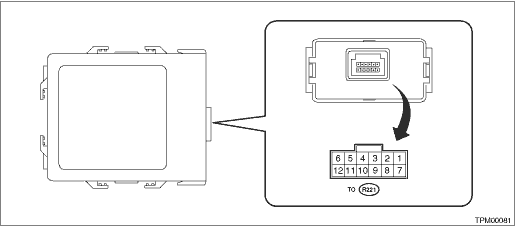
Terminal No. | Item | Measuring condition | Standard |
4 (IG) ←> Chassis ground | Voltage | IG OFF > ON | 0 V > 10 — 14 V |
5 (GND) ←> Chassis ground | Resistance | Always | Less than 1 ? |
6 (+B) ←> Chassis ground | Voltage | Always | 10 — 14 V |
11 (U-ART com.) | — | Cannot be measured | — |
2. BODY INTEGRATED UNIT
Refer to “Control Module I/O Signal” of “BODY CONTROL SYSTEM (DIAGNOSTICS)” section. Control Module I/O Signal > ELECTRICAL SPECIFICATION">

 Inspection
SECURITY AND LOCKS > Keyless Entry SystemINSPECTION1. SYMPTOM CHARTSymptomsRepair orderReferenceNone of the functions of the keyless entry system operate.1. Check the keyless transmitter battery. K ...
Other materials:
Dtc u0101 lost communication with tcm
INSTRUMENTATION/DRIVER INFO (DIAGNOSTICS) > Diagnostic Procedure with Diagnostic Trouble Code (DTC)DTC U0101 LOST COMMUNICATION WITH TCMDetected when CAN data from TCM does not arrive.NOTE:Perform the diagnosis for LAN system. Basic Diagnostic Procedure > PROCEDURE"> ...
Removal
COOLING(H4DO) > Radiator Sub Fan and Fan MotorREMOVAL1. Disconnect the ground cable from battery. NOTE">2. Remove the air intake duct. Air Intake Duct > REMOVAL">3. Disconnect the connector from the sub fan motor assembly.4. Remove the bolts which hold the radiator sub fan sh ...
Dtc b2801 tcm abnormal
EyeSight (DIAGNOSTICS) > Diagnostic Procedure with Diagnostic Trouble Code (DTC)DTC B2801 TCM ABNORMALDetected when error occurs in the automatic transmission.When lost communication with TCM and TCM abnormal occur simultaneously, perform diagnosis for lost communication with TCM first.NOTE:Check ...
