
Subaru Crosstrek Service Manual: Electrical component location Location
TELEMATICS SYSTEM (DIAGNOSTICS) > Electrical Component Location
LOCATION
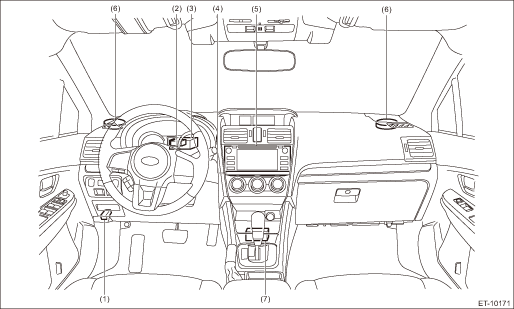
(1) | Data link connector | (4) | Data communication module (DCM) | (6) | Instrument panel speaker |
(2) | GPS antenna | (5) | Audio or navigation | (7) | Airbag CM |
(3) | Telematics sub antenna |
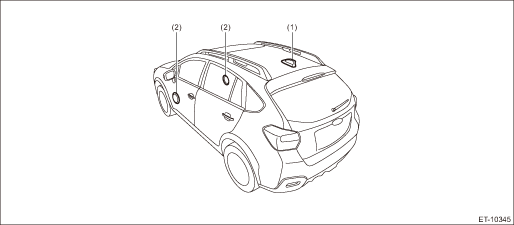
(1) | Telematics antenna | (2) | Door speaker (standard specification) |
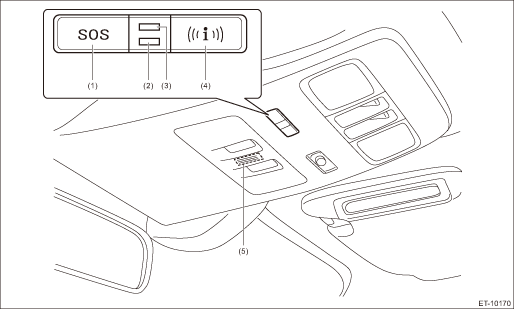
(1) | SOS button | (3) | GREEN LED | (5) | Microphone |
(2) | RED LED | (4) | i-button |
NOTE:
For the LED operation condition, refer to "LED operation condition" in "Check List for Interview". Check List for Interview > CHECK">
 Clear memory mode Operation
TELEMATICS SYSTEM (DIAGNOSTICS) > Clear Memory ModeOPERATION1. On «Start» display, select «Diagnosis».2. On «Vehicle selection» display, input the target vehicle information and select «Conf ...
 Inspection mode Procedure
TELEMATICS SYSTEM (DIAGNOSTICS) > Inspection ModePROCEDUREIt is possible to diagnose the DTC by performing the indicated inspection mode.After correcting the DTC, perform a necessary inspection mod ...
Other materials:
Installation
ENTERTAINMENT > AntennaINSTALLATIONCAUTION:• After installing the center grille assembly, check that the air vent grille of the center grille assembly is inserted correctly into the air vent duct.• Before handling the airbag system components, always refer to “CAUTION” of ...
Dtc b1406 scu_eeprom
IMMOBILIZER (DIAGNOSTICS) > Diagnostic Procedure with Diagnostic Trouble Code (DTC)DTC B1406 SCU_EEPROMDTC DETECTING CONDITION:• Defective security control module• ROM of security control module cannot be accessedCAUTION:When the security control module is replaced, registration of th ...
Dtc b28a8 internal stereo camera communication 2
EyeSight (DIAGNOSTICS) > Diagnostic Procedure with Diagnostic Trouble Code (DTC)DTC B28A8 INTERNAL STEREO CAMERA COMMUNICATION 2Detected when error occurs in the communication data inside the control module caused by external factors such as noises.NOTE:If the same DTC is still detected after the ...
