
Subaru Ascent 2018-2026 Owner's Manual: Cargo area cover
The Subaru Ascent cargo area cover is designed to shield stored items from direct sunlight and provide additional privacy. It can also be removed easily when transporting larger cargo.
Using the cover
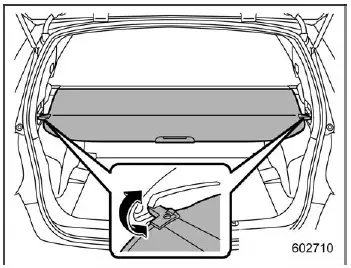
To extend the cargo cover in the Subaru Ascent, pull it outward from its housing and secure the ends into the side hooks as illustrated. To retract it, release the hooks and allow the cover to rewind smoothly. Always guide the cover back gently to prevent sudden retraction.
WARNING
Never place objects on top of the extended cargo cover in the Subaru Ascent. In the event of sudden braking or a collision, items may fall forward, potentially causing serious injury.
CAUTION
Take care to avoid scratching the rear gate struts while handling the cover.
Damage to the struts may lead to gas leakage and prevent the rear gate from staying open properly.
To remove the cover housing
1. Fully retract the cargo cover.
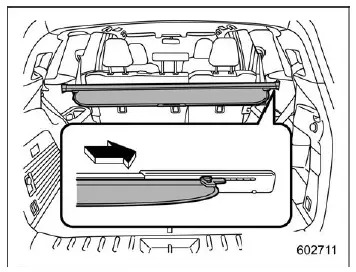
2. Slide the housing to the right to reduce its length.
3. Lift and remove it from the mounting retainers.
Stowage of the cargo area cover
The Subaru Ascent cargo cover can be conveniently stored beneath the cargo floor.
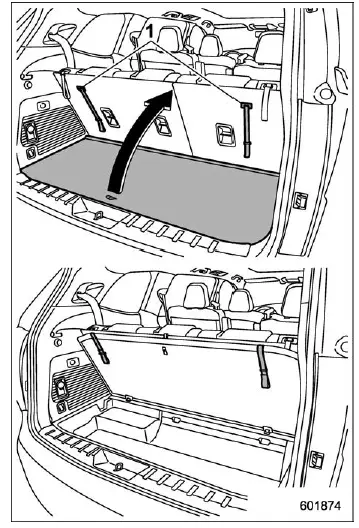
- Straps
1. Lift and fold the rear section of the cargo floor panel.
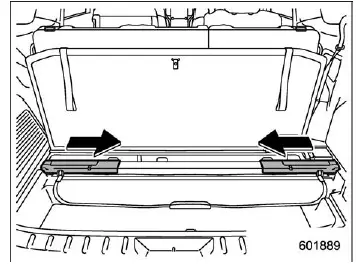
2. Compress the cargo cover and place it into the storage compartment.
3. Return the cargo floor panel to its original position.
NOTE
When storing the cargo cover in the Subaru Ascent, insert the right side first into the designated recess. To remove it, lift the left side and slide it out carefully.
To install the cover housing
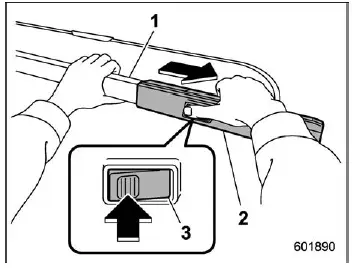
- Cargo cover inner housing
- Cargo cover outer housing
- Cargo cover button
1. Hold both sides of the housing and press the release button to extend it.
2. Adjust the housing length as required.
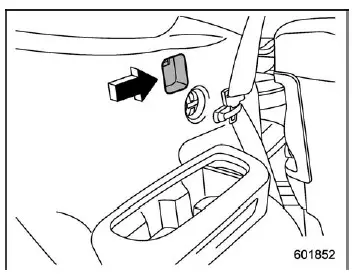
3. Insert both ends securely into the mounting recesses.
NOTE
Before installing the cargo cover in the Subaru Ascent, make sure the window-side seatbelt is properly secured in its holder.
 Coat hook
The Subaru Ascent includes a coat hook integrated into the rear passenger assist
grip, offering a practical place to hang clothing items.
WARNING
Follow these safety guidelines when using ...
 Cargo tie-down hooks
The Subaru Ascent cargo area includes multiple tie-down hooks that can be used
to secure items with straps, nets, or ropes, helping prevent movement during transit.
To use them, fold the hooks ...
Other materials:
Shift lock release
If the select lever cannot be operated, turn
the ignition switch back to the "ON"
position then move the select lever to the
"P" position with the select lever button
pressed and brake pedal depressed.
If the select lever does not move after
performing the above procedure, perform
the follo ...
Dtc u0427 invalid data received from vehicle security control module
LAN SYSTEM (DIAGNOSTICS) > Diagnostic Procedure with Diagnostic Trouble Code (DTC)DTC U0427 INVALID DATA RECEIVED FROM VEHICLE SECURITY CONTROL MODULEDTC DETECTING CONDITION:Defective data was transmitted from keyless access CM.TROUBLE SYMPTOM:Cooperation control of keyless access does not operat ...
Head restraint adjustment
Both the rear window side seats and the
rear center seat are equipped with head
restraints.
WARNING
Never drive the vehicle with the
head restraints removed because
they are designed to reduce the
risk of serious neck injury in the
event that the vehicle is struck
from the rear. The ...
