
Subaru Crosstrek Owners Manual: BSD/RCTA OFF switch
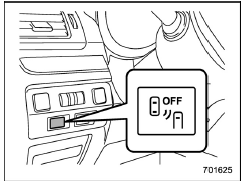
BSD/RCTA OFF switch
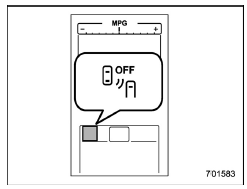
BSD/RCTA OFF indicator
If the BSD/RCTA OFF switch is pressed, the BSD/RCTA OFF indicator appears on the multi information display of the combination meter, and the BSD/RCTA is deactivated.
Press the switch again to activate the BSD/RCTA. The BSD/RCTA OFF indicator will disappear.
NOTE
In the following cases, the system may not operate properly due to blocked radar waves. Press the BSD/ RCTA OFF switch to deactivate the system.
- When towing a trailer
- When a bicycle carrier or other item is fitted to the rear of the vehicle
- When using a chassis dynamometer or free roller device, etc.
- When running the engine and making the wheels rotate while lifting up the vehicle
If the ignition switch is turned to the "LOCK"/"OFF" position, the last known status of the system is maintained. For example, if the ignition switch is turned to the "LOCK"/"OFF" position with the BSD/RCTA deactivated, the BSD/RCTA will remain deactivated the next time the ignition switch is turned to the "ON" position.
If the vehicle battery is disconnected due to situations such as battery terminal or fuse replacement, after the battery is reconnected, the BSD/RCTA will be activated.
 System malfunction indicator
System malfunction indicator
At first, this message will appear
Then this message will appear
This indicator appears when a malfunction
occurs in the system. Contact a SUBARU
dealer and ...
 Certification for the BSD/RCTA
U.S.-spec. models:
FCC ID: OAYSRR2A
CAUTION
FCC WARNING
Changes or modifications not expressly
approved by the party responsible
for compliance could void
the user's authority to operate the
e ...
Other materials:
Dtc p062f internal control module eeprom error
CONTINUOUSLY VARIABLE TRANSMISSION (DIAGNOSTICS) > Diagnostic Procedure with Diagnostic Trouble Code (DTC)DTC P062F INTERNAL CONTROL MODULE EEPROM ERRORDTC DETECTING CONDITION:Detected when two consecutive driving cycles with fault occur.TROUBLE SYMPTOM:TCM EEPROM malfunctionSTEPCHECKYESNO1.CHECK ...
Dtc u0073 control module communication bus off
ENGINE (DIAGNOSTICS)(H4DO) > Diagnostic Procedure with Diagnostic Trouble Code (DTC)DTC U0073 CONTROL MODULE COMMUNICATION BUS OFFNOTE:For the diagnostic procedure, refer to LAN section. Basic Diagnostic Procedure">1. OUTLINE OF DIAGNOSISDetect malfunction of CAN communication.Judge as N ...
Operation
VEHICLE DYNAMICS CONTROL (VDC) > ABS Sequence ControlOPERATION1. While the ABS sequence control is being performed, the operation of the hydraulic unit can be checked using the brake tester or pressure gauge after the hydraulic unit solenoid valve operation.2. ABS sequence control can be started ...
