
Subaru Ascent 2018-2026 Owner's Manual: Automatic rear climate control operation
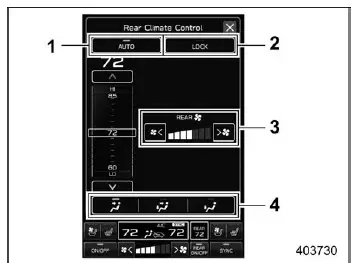
Rear climate control screen
- Rear climate control auto mode icon
- Rear climate control panel lock icon (if equipped)
- Fan speed
- Airflow mode
The Subaru Ascent provides convenient rear climate management through the central display, allowing rear passengers to enjoy a comfortable environment tailored to their needs.
To activate automatic rear climate control in the Subaru Ascent:
1. Touch the rear climate control mode indicator on the display.
2. Select "AUTO" mode.
3. Adjust the desired temperature for the rear cabin area.
NOTE
If the lock icon is displayed on the rear climate control indicator, rear passengers will not be able to adjust settings using the rear panel. This ensures that the driver maintains full control over the climate system.
Rear climate control panel
For Subaru Ascent models equipped with a dedicated rear control panel, passengers can also operate climate settings independently from the rear seating area.
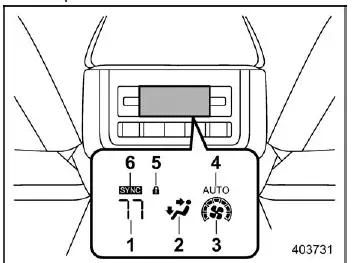
Display of the rear climate control panel
- Set temperature indicator
- Airflow mode indicator
- Fan speed indicator
- AUTO indicator
- Rear climate control lock indicator
- SYNC indicator
To enable AUTO mode from the rear control panel in the Subaru Ascent:
1. Press the "AUTO" button.
2. Set the desired temperature using the controls.
NOTE
If the rear climate system is locked via the central display, a lock icon will appear on both the main screen and rear panel. When this indicator is active, the rear panel controls are disabled. To restore functionality, unlock the system through the vehicle settings menu.
Sensors
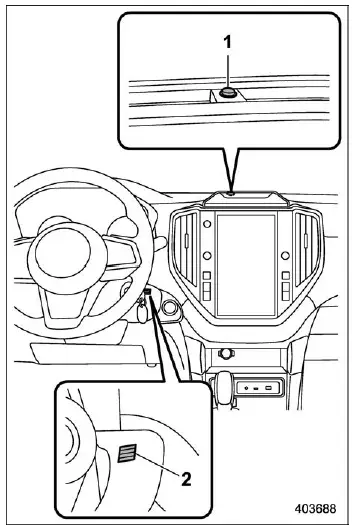
- Solar sensor
- Interior air temperature sensor
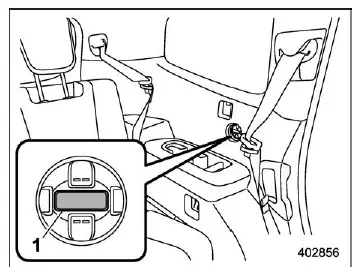
- Rear interior air temperature sensor
The Subaru Ascent automatic climate system relies on multiple sensors to accurately regulate cabin conditions. These include solar sensors that detect sunlight intensity and temperature sensors that monitor interior air conditions.
Because these components are sensitive, proper care is essential to maintain optimal system performance in the Subaru Ascent.
- Avoid striking or applying pressure to the sensors
- Keep sensors dry and free from moisture
- Do not cover or obstruct sensor areas
- Do not touch the rear interior temperature sensor directly
The advanced climate control system in the Subaru Ascent uses intelligent automation and precise sensor data to maintain a comfortable interior environment, adapting seamlessly to changing weather conditions and passenger preferences.
 Automatic front climate control operation
Front climate control screen
Air inlet selection
Air conditioner
Airflow mode
Fan speed
In the Subaru Ascent, selecting the automatic climate control mode allows the
system to intel ...

Other materials:
Operation
INSTRUMENTATION/DRIVER INFO > Combination Meter SystemOPERATION1. SELF-DIAGNOSIS DISPLAY MODEThe self-diagnosis (checking of each meter, warning light, indicator light, illumination, LCD/TFT) of combination meter can be performed in the following procedure.1. ProcedureCAUTION:Perform the steps de ...
Removal
LUBRICATION(H4DO) > Oil Level SwitchREMOVAL1. Open the front hood, and make alignment marks (A) on the front hood striker and the front hood using a marker pen.2. Remove the front hood striker from the front hood.3. Change the front hood stay position from (A) to (B), and completely open the fron ...
Removal
CONTINUOUSLY VARIABLE TRANSMISSION(TR580) > Primary Pulley and Secondary PulleyREMOVALNOTE:Always replace primary pulley and secondary pulley as an assembly because they are non-disassembled parts.1. Remove the transmission assembly from the vehicle. Automatic Transmission Assembly > REMOVAL& ...
