
Subaru Ascent 2018-2026 Owner's Manual: Automatic front climate control operation
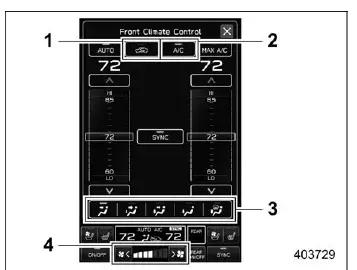
Front climate control screen
- Air inlet selection
- Air conditioner
- Airflow mode
- Fan speed
In the Subaru Ascent, selecting the automatic climate control mode allows the system to intelligently regulate the cabin environment without constant manual adjustments. Once activated, the system automatically manages several key parameters to maintain the desired temperature and comfort level.
- Fan speed
- Airflow distribution
- Air inlet selection (inside or outside air)
- Air conditioning activation
To enable automatic climate control in the Subaru Ascent, follow these steps:
If "AUTO" is visible on the customizable icon:
1. Tap "AUTO" directly on the display.
2. Adjust the temperature to your preferred setting.
If "AUTO" is not displayed on the customizable icon:
1. Touch the climate control mode indicator to open the settings menu.
2. Select "AUTO" from the available options.
3. Set the desired cabin temperature.
NOTE
- The automatic climate control system in the Subaru Ascent should only be operated while the engine is running to ensure proper functionality.
- Even when cooling demand is minimal, the system may activate the air conditioner if the selected temperature is significantly lower than the current cabin temperature. In this case, the "A/C" indicator will illuminate.
- The air conditioning system may not operate under certain conditions:
- When the cabin temperature is already low
- When the outside temperature approaches approximately 32°F (0°C)
- The available temperature adjustment range in the Subaru Ascent may vary depending on regional specifications.
- When "AUTO" mode is active, performing certain manual adjustments will
override automatic operation and deactivate the "AUTO" indicator:
- Changing fan speed manually
- Adjusting airflow direction
- Activating the defroster
- Enabling MAX A/C mode
Once manual adjustments are made, the Subaru Ascent climate system can still be returned to automatic operation at any time by selecting "AUTO" again on the display.
To turn off the front climate control system in the Subaru Ascent, simply touch the "ON/OFF" control on the screen.
At shutdown, the air inlet mode behaves differently depending on whether automatic or manual control is active:
- In AUTO mode: the system switches to outside air circulation
- In manual mode: the current setting remains unchanged
When the ignition of the Subaru Ascent is switched from "ON" to "OFF"/"LOCK" or "ACC", the system will automatically default to outside air intake, regardless of previous settings.
 Automatic rear climate control operation
Rear climate control screen
Rear climate control auto mode icon
Rear climate control panel lock icon (if equipped)
Fan speed
Airflow mode
The Subaru Ascent provides convenient rear cl ...
Other materials:
Dtc b2a03 gps antenna circuit
TELEMATICS SYSTEM (DIAGNOSTICS) > Diagnostic Procedure with Diagnostic Trouble Code (DTC)DTC B2A03 GPS ANTENNA CIRCUITDiagnosis start condition:When ignition switch is ON.DTC detecting condition:Any of the followings continues for 5 seconds or more.• GPS antenna impedance is more than 1 M?. ...
Dtc c1542 clutch switch on malfunction
VEHICLE DYNAMICS CONTROL (VDC) (DIAGNOSTICS) > Diagnostic Procedure with Diagnostic Trouble Code (DTC)DTC C1542 CLUTCH SWITCH ON MALFUNCTIONDTC detecting condition:Abnormal clutch signalTrouble symptom:Hill start assist does not operate.NOTE:Depending on the user clutch operation patterns, the hi ...
Dtc p0842 transmission fluid pressure sensor/switch "a" circuit low
CONTINUOUSLY VARIABLE TRANSMISSION (DIAGNOSTICS) > Diagnostic Procedure with Diagnostic Trouble Code (DTC)DTC P0842 TRANSMISSION FLUID PRESSURE SENSOR/SWITCH "A" CIRCUIT LOWDTC detecting condition:Immediately at fault recognitionTrouble symptom:Shift characteristics malfunctionCAUTION:U ...
