
Subaru Crosstrek Owners Manual: Vehicle Dynamics Control OFF switch
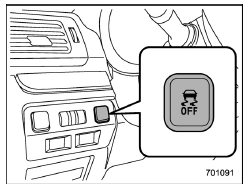
Vehicle Dynamics Control OFF switch
Vehicle Dynamics Control OFF switch Pressing the Vehicle Dynamics Control OFF switch deactivates the Vehicle Dynamics Control system.
Creating an adequate driving wheel slip by deactivating the Vehicle Dynamics Control system temporarily may help to escape from the following situations. Use the Vehicle Dynamics Control OFF switch as necessary.
- a standing start on a steeply sloping road with a snowy, gravel-covered, or otherwise slippery surface
- extrication of the vehicle when its wheels are stuck in mud or deep snow
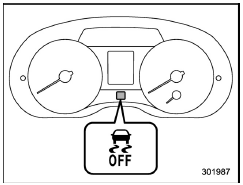
Vehicle Dynamics Control OFF indicator light (type A)
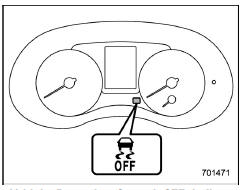
Vehicle Dynamics Control OFF indicator light (type B)
When the switch is pressed during engine
operation, the Vehicle Dynamics Control
OFF indicator light " " on the
combination
meter illuminates. The Vehicle Dynamics
Control system will be deactivated and the
vehicle will behave like a model not
equipped with the Vehicle Dynamics Control
system. When the switch is pressed
again to reactivate the Vehicle Dynamics
Control system, the Vehicle Dynamics
Control OFF indicator light turns off.
" on the
combination
meter illuminates. The Vehicle Dynamics
Control system will be deactivated and the
vehicle will behave like a model not
equipped with the Vehicle Dynamics Control
system. When the switch is pressed
again to reactivate the Vehicle Dynamics
Control system, the Vehicle Dynamics
Control OFF indicator light turns off.
With the Vehicle Dynamics Control system deactivated, traction and stability enhancement offered by Vehicle Dynamics Control system is unavailable. Therefore you should not deactivate the Vehicle Dynamics Control system except under above-mentioned situations.
NOTE
- When the switch has been pressed to deactivate the Vehicle Dynamics Control system, the Vehicle Dynamics Control system automatically reactivates itself the next time the ignition switch is turned to the "LOCK"/"OFF" position and the engine is restarted.
- If the switch is held down for 30 seconds or longer, the indicator light turns off, the Vehicle Dynamics Control system is activated, and the system ignores any further pressing of the switch. To make the switch usable again, turn the ignition switch to the "LOCK"/"OFF" position and restart the engine.
- When the switch is pressed to deactivate the Vehicle Dynamics Control system, the vehicle's running performance is comparable with that of a vehicle that does not have a Vehicle Dynamics Control system. Do not deactivate the Vehicle Dynamics Control system except when absolutely necessary.
- Even when the Vehicle Dynamics Control system is deactivated, components of the brake control system may still activate. When the brake control system is activated, the Vehicle Dynamics Control operation indicator light flashes.
 System features
In the event of wheelspin and/or skidding
on a slippery road surface and/or during
cornering and/or an evasive maneuver,
the Vehicle Dynamics Control system
adjusts the engine's output and the
wh ...
 Tire pressure monitoring system (TPMS) (U.S.-spec. models)
Low tire pressure warning light (type A)
Low tire pressure warning light (type B)
The tire pressure monitoring system provides
the driver with a warning message
when tire pressure is sever ...
Other materials:
Stowage of the cargo area cover
The cargo area cover can be stowed in
under the cargo floor.
1. Raise and fold the rear end of the
cargo floor board.
2. Stow the cover housing in the cargo
area end.
3. Put the cargo floor board back while
hanging two retaining straps on the hooks
that are located on the rear wa ...
Adjustment
MANUAL TRANSMISSION AND DIFFERENTIAL(5MT) > Reverse Idler GearADJUSTMENT1. Select the appropriate reverse shifter lever from the table below, and adjust until the clearance between the reverse idler gear and transmission case wall is within specification.Clearance A:6.0 — 7.5 mm (0.236 — 0.29 ...
Dtc c2531 control module cpu
POWER ASSISTED SYSTEM (POWER STEERING) (DIAGNOSTICS) > Diagnostic Procedure with Diagnostic Trouble Code (DTC)DTC C2531 CONTROL MODULE CPUTROUBLE SYMPTOM:• The steering wheel operation feels heavy.• STEERING warning light illuminates.NOTE:When this code is displayed, replace the power ...
