
Subaru Crosstrek Service Manual: Installation
DRIVE SHAFT SYSTEM > Rear Hub Unit Bearing
INSTALLATION
1. Place the rear brake back plate between the rear axle housing and the rear hub unit bearing, and tighten the bolt.
CAUTION:
• Be careful not to damage the magnetic encoder.
• Do not get closer the tool which charged magnetism to magnetic encoder.
• Use a new bolt.
Tightening torque:
65 N·m (6.6 kgf-m, 47.9 ft-lb)
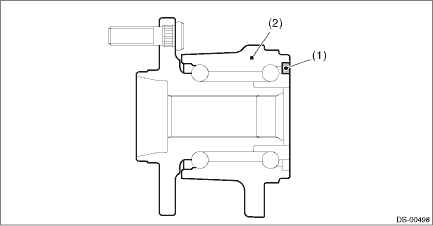
(1) | Magnetic encoder | (2) | Rear hub unit bearing |
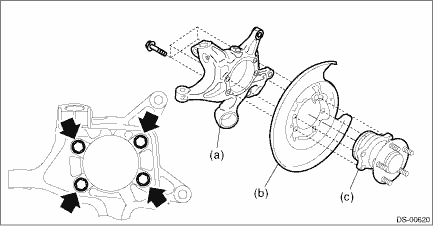
(a) | Rear axle housing | (b) | Rear brake back plate | (c) | Rear hub unit bearing |
2. Install the rear drive shaft assembly.
CAUTION:
• Do not hammer the drive shaft assembly when installing.
• Use new axle nuts.
(1) Insert the drive shaft assembly into the hub spline, and pull it into the specified position.
(2) Tighten the axle nut temporarily.
3. Install the disc rotor to the rear hub unit bearing.
4. Install the caliper body assembly to the rear axle housing.
Tightening torque:
Refer to “COMPONENT” of “General Description” for the tightening torque. General Description > COMPONENT">
5. Install the brake hose bracket.
Tightening torque:
33 N·m (3.4 kgf-m, 24.3 ft-lb)
6. Install the rear ABS wheel speed sensor.
Tightening torque:
7.5 N·m (0.8 kgf-m, 5.5 ft-lb)
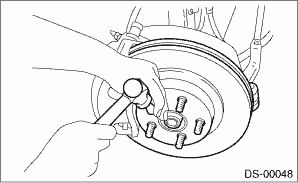
7. While pressing the brake pedal, tighten the new axle nuts to the specified torque.
CAUTION:
Do not load the rear axle before tightening the axle nut. Doing so may damage the hub unit bearing.
Tightening torque:
190 N·m (19.4 kgf-m, 140.1 ft-lb)
8. After tightening the axle nut, lock it securely.
9. Install the rear wheels, and perform the following inspections.
Tightening torque:
Except for C4 model: 120 N·m (12.2 kgf-m, 88.5 ft-lb)
C4 model: 100 N·m (10.2 kgf-m, 73.8 ft-lb)
(1) Check the wheels for smooth rotation.
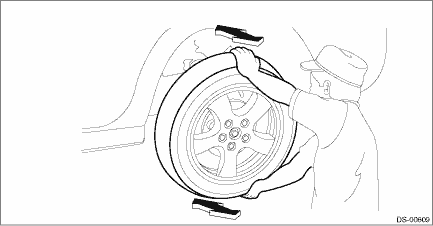
(2) Check that there is no looseness by moving the upper and lower portions of rear tire in an axial direction with the brake pedal released.
• Looseness exists > Check the rear hub unit bearing. Rear Hub Unit Bearing > INSPECTION">
 Inspection
DRIVE SHAFT SYSTEM > Rear Hub Unit BearingINSPECTION1. Moving the rear tire up and down by hand, check there is no looseness in bearing, and check the wheel rotates smoothly.CAUTION:If there is uns ...
 General diagnostic table Inspection
DRIVE SHAFT SYSTEM > General Diagnostic TableINSPECTIONNOTE:Vibration while cruising may be caused by an unbalanced tire, improper tire inflation pressure, improper wheel alignment, etc.SymptomsPos ...
Other materials:
Inspection
CONTINUOUSLY VARIABLE TRANSMISSION(TR580) > Reverse Brake AssemblyINSPECTION• Inspect the drive plate facing for wear and damage.• Check the driven plate for discoloration (burnt color).• Check for worn snap ring, fatigue or damaged return spring or deformed spring retainer.&bul ...
Dtc p081a starter disable circuit low
ENGINE (DIAGNOSTICS)(H4DO) > Diagnostic Procedure with Diagnostic Trouble Code (DTC)DTC P081A STARTER DISABLE CIRCUIT LOWDTC detecting condition:Immediately at fault recognitionTrouble symptom:Failure of engine to startCAUTION:After servicing or replacing faulty parts, perform Clear Memory Mode ...
Installation
EXTERIOR/INTERIOR TRIM > Front GrilleINSTALLATIONCAUTION:• Install so that the front end of the under cover (b) comes inside the bumper face - front (a), and the front end of the mud guard (c) comes outside the bumper face - front (a).• Before installing the bumper face, match the cla ...
