
Subaru Ascent 2018-2026 Owner's Manual: Features
In the Subaru Ascent, all essential vehicle data and system controls are intelligently integrated into the center information display, providing the driver with a unified and highly intuitive interface. This display presents a wide range of information, including vehicle settings, real-time vehicle status, navigation system functions (if equipped), audio system controls, and climate control adjustments. The Subaru Ascent ensures that all key systems are easily accessible from one central location, enhancing both convenience and driving efficiency.
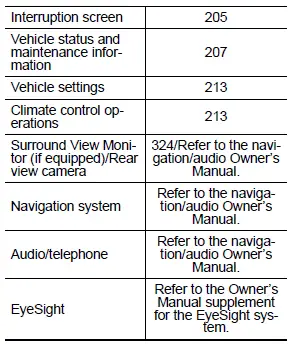
Additionally, the center information display in the Subaru Ascent allows users to configure and reset its own system settings, enabling personalization of the interface according to driver preferences and usage habits.
NOTE
- While the Subaru Ascent is in motion, certain functions or menu selections may be restricted to minimize driver distraction and ensure safe operation.
- The language and measurement units used in both the center information display and the combination meter display (color LCD) can be customized to suit regional preferences or driver requirements.
- The illustrations shown in this Owner’s Manual are provided as examples. Actual display layouts in the Subaru Ascent may vary depending on market specifications and installed equipment.
Welcome screen
The Subaru Ascent features a visually engaging welcome screen and good-bye screen, both presented as animated graphics on the combination meter display and the center information display when entering or exiting the vehicle. These animations enhance the overall user experience and add a refined digital touch to the vehicle’s interface.
When the driver’s door of the Subaru Ascent is opened and then closed, the welcome animation will be displayed briefly, greeting the driver and indicating system readiness.
NOTE
- The welcome screen will automatically disappear if the ignition switch is turned to the "ON" position while it is still being displayed.
- The welcome screen function in the Subaru Ascent can be enabled or disabled through system settings.
- After the welcome screen has been shown once, it may not reappear immediately upon subsequent door operations. This is a normal system behavior and does not indicate a malfunction.
Good-bye screen
The good-bye screen in the Subaru Ascent will be displayed under specific conditions, providing a smooth visual transition when the vehicle is turned off:
- The driver’s door is opened after the ignition switch has been set to the "OFF" position.
- Approximately 3 minutes have passed after turning the ignition switch to "OFF" with the driver’s door remaining closed.
- Up to 10 minutes have elapsed while using the hands-free phone system after switching the ignition to "OFF".
- The vehicle battery voltage is low at the moment the ignition switch is turned to "OFF".
Interruption screen
During operation of the Subaru Ascent, important notifications such as reminders, weather updates (if equipped), or traffic information (if equipped) may temporarily interrupt the currently displayed screen. These messages are accompanied by an audible alert to draw the driver’s attention. It is important to review such notifications promptly and respond appropriately to maintain optimal safety and performance.
Touch screen operations
The Subaru Ascent center information display is equipped with a responsive touch screen interface, allowing the driver and passengers to interact directly with the system using intuitive gestures.
Touch
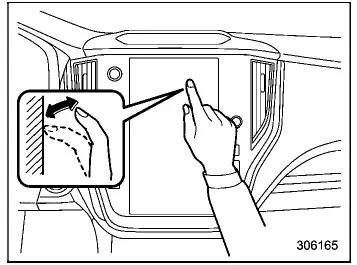
Briefly tap the screen once to select or activate a function.
Drag
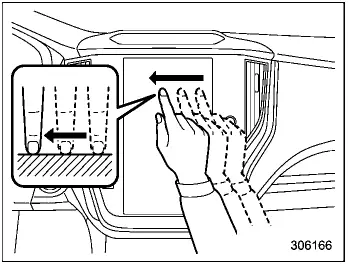
Touch and hold the screen, then move your finger to reposition elements or scroll through content smoothly.
Swipe
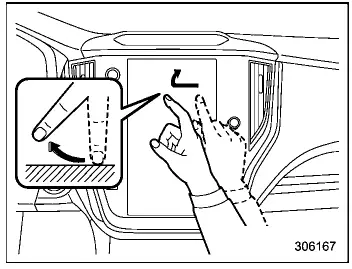
Quickly slide your finger across the screen to navigate between menus or switch display pages in the Subaru Ascent system.
NOTE
Swipe responsiveness may be slightly affected at high altitudes due to environmental conditions.
The Subaru Ascent interface is designed to feel natural and responsive in everyday driving, allowing drivers to interact with key vehicle systems effortlessly while maintaining full focus on the road ahead.
 Center information display (CID)
WARNING
While operating the center information display in the Subaru Ascent, always
maintain full attention to driving conditions. If interacting with the display interferes
with your concentrati ...
 Display
Touch screen
HOME icon
Status bar
Information bar
Main screen
Driver profiles icon
Manage device icon
Climate control screen
Car settings icon
In the Subaru Ascent, the adv ...
Other materials:
Diagnostics with phenomenon Inspection
Blind Spot Detection/Rear Cross Traffic Alert (DIAGNOSTICS) > Diagnostics with PhenomenonINSPECTIONSymptomsMaintenance partsBSD/RCTA does not operate.FuseLAN system Basic Diagnostic Procedure">Body control system Basic Diagnostic Procedure">Radar sensor LHRadar sensor RHBSD/RCTA ...
Inspection
PARKING BRAKE > Parking Brake Assembly (Rear Disc Brake)INSPECTION1. Measure the inner diameter of the rear disc rotor. If scoring or worn is found on the disc, replace the rear disc rotor.Disc rotor inner diameter:Specification: 170 mm (6.69 in)Service limit: 171 mm (6.73 in)2. Measure the linin ...
Dtc p0604 internal control module random access memory (ram) error
ENGINE (DIAGNOSTICS)(H4DO) > Diagnostic Procedure with Diagnostic Trouble Code (DTC)DTC P0604 INTERNAL CONTROL MODULE RANDOM ACCESS MEMORY (RAM) ERRORDTC DETECTING CONDITION:Immediately at fault recognitionTROUBLE SYMPTOM:• Engine does not start• Engine stallCAUTION:After servicing or ...
