
Subaru Crosstrek Service Manual: Wiring diagram
CONTROL SYSTEMS > AT Shift Lock Control System
WIRING DIAGRAM
1. MODEL WITHOUT PUSH BUTTON IGNITION SWITCH
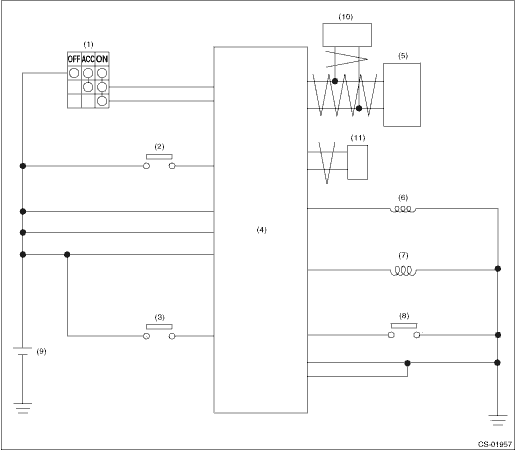
(1) | Ignition switch | (5) | TCM (shift range information) | (9) | Battery |
(2) | Stop light and brake switch | (6) | Key lock solenoid | (10) | ECM (delivery (test) mode signal) |
(3) | Key warning switch | (7) | Shift lock solenoid | (11) | VDC CM (vehicle speed information) |
(4) | Body integrated unit | (8) | “P” range switch |
2. MODEL WITH PUSH BUTTON IGNITION SWITCH
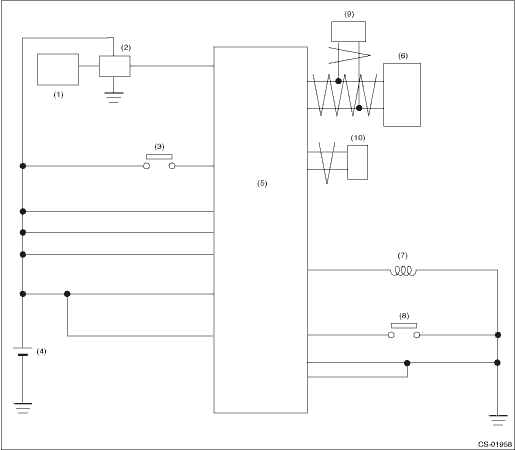
(1) | Keyless access CM | (5) | Body integrated unit | (8) | “P” range switch |
(2) | IG relay 1 (push button start) | (6) | TCM (shift range information) | (9) | ECM (delivery (test) mode signal) |
(3) | Stop light and brake switch | (7) | Shift lock solenoid | (10) | VDC CM (vehicle speed information) |
(4) | Battery |
 Location
CONTROL SYSTEMS > AT Shift Lock Control SystemLOCATION1. MODEL WITHOUT PUSH BUTTON IGNITION SWITCH(1)TCM (“P” range)(4)Key cylinder (with built-in key warning switch)(6)“P” ...

Other materials:
Odometer
Type A
Trip knob
Type B
Trip knob (U.S.-spec. models)
Trip knob (except U.S.-spec. models)
This meter displays the odometer when
the ignition switch is in the "ON" position.
The odometer shows the total distance
that the vehicle has been driven.
If you press the trip knob ...
Dtc b1806 open in passenger s airbag
AIRBAG SYSTEM (DIAGNOSTICS) > Diagnostic Chart with Trouble CodeDTC B1806 OPEN IN PASSENGER’S AIRBAGDiagnosis start condition:Ignition voltage is 10 V to 16 V.DTC detecting condition:• Airbag main harness circuit is open.• Airbag module harness (passenger’s side) circuit i ...
Dtc b19f0 short in front p/t 2 rh
AIRBAG SYSTEM (DIAGNOSTICS) > Diagnostic Chart with Trouble CodeDTC B19F0 SHORT IN FRONT P/T 2 RHDiagnosis start condition:Ignition voltage is 10 V to 16 V.DTC detecting condition:• Lap seat belt pretensioner (RH) circuit is shorted.• Lap seat belt pretensioner (RH) is faulty.• ...
