
Subaru Crosstrek Owners Manual: Turning the system on and off
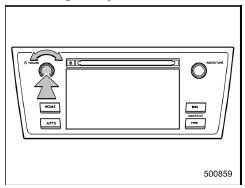
Press the power/VOLUME knob to turn the audio/visual system on and off. When the system turns on, the mode that was in use the last time the system was turned off will be displayed. Press and hold the knob to turn the display off.
Turn this knob to adjust the volume.
 Basic operation
This section describes some of the basic
features of the audio/visual system. Some
information may not pertain to your system.
Your audio/visual system works when the
ignition switch is turned t ...
 Selecting an audio source
1. Press the AUDIO/TUNE knob.
2. Select the desired source.
Example: Source select screen
NOTE
If the audio control screen appears,
select the "Source" key on the audio
screen or pr ...
Other materials:
Removal
GLASS/WINDOWS/MIRRORS > Front Door GlassREMOVAL1. Disconnect the ground cable from battery and wait for at least 60 seconds before starting work. NOTE">2. Remove the trim panel - front door. Door Trim > REMOVAL">3. Remove the sealing cover - front door. Front Sealing Cover & ...
Profiles
This system supports the following services.
NOTE
If your cell phone does not support HFP, registering the Bluetooth
phone or using OPP, PBAP, or SPP profiles individually
will not be possible.
If the connected Bluetooth device version is older than recommended
or incompatible, the ...
Inspection
STARTING/CHARGING SYSTEMS(H4DO) > Battery Current & Temperature SensorINSPECTION1. BATTERY CURRENT SENSORCAUTION:Pay attention to polarity when checking the resistance in the battery current sensor.Check the resistance between the battery current sensor terminals.Terminal No.Standard1 (+) and ...
