
Subaru Crosstrek Owners Manual: Turn signal lever
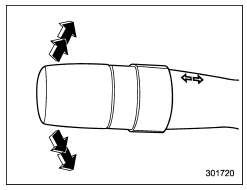
To activate the right turn signal, push the turn signal lever up. To activate the left turn signal, push the turn signal lever down. When the turn is finished, the lever will return automatically. If the lever does not return after cornering, return the lever to the neutral position by hand.
To signal a lane change, push the turn signal lever up or down slightly and hold it during the lane change. The turn signal indicator lights will flash in the direction of the turn or lane change. The lever will return automatically to the neutral position when you release it.
One-touch lane changer
To flash the turn signal and turn signal indicator light three times, push the turn signal lever up or down slightly and immediately release it.
The operational/non-operational setting of the one-touch lane changer's can be changed by a SUBARU dealer. Contact the nearest SUBARU dealer for details.
 Daytime running light system
WARNING
The brightness of the illumination of
the high beam headlights is reduced
by the daytime running light system.
The light switch must always be
turned to the " " position when it
is dar ...
 Illumination brightness control
The illumination brightness of the instrument
panel dims under the following
conditions.
when the light switch is in the "
" or
" " position
You can also adjust the illumination brigh ...
Other materials:
Automatic rear climate control operation
Rear climate control screen
Rear climate control auto mode icon
Rear climate control panel lock icon (if equipped)
Fan speed
Airflow mode
The Subaru Ascent provides convenient rear climate management through the central
display, allowing rear passengers to enjoy a comfortable envi ...
Voice command example: Call
name
1. Press the talk switch on the steering
wheel.
2. Say "Call <contacts>"
A confirmation screen will be displayed
showing the recognition results.
If multiple matching items are
found, a selection screen will be
displayed. Say "<number>" or select
the number.
NOTE
...
Cleaning ventilation grille
Front ventilation inlet grille
Always keep the front ventilation inlet grille
free of snow, leaves, or other obstructions
to ensure efficient heating and defrosting.
Since the condenser is located in front of
the radiator, this area should be kept clean
because cooling performance i ...
