
Subaru Crosstrek Owners Manual: To arm the system using power door locking switches
1. Close all windows.
2. Remove the key from the ignition switch (models without "keyless access with push-button start system")/turn the push-button ignition switch to the "OFF" position (models with "keyless access with push-button start system").
3. Open the doors and get out of the vehicle.
4. Make sure that the engine hood is locked.
5. Close the doors (and the rear gate) but leave only the driver's door or the front passenger's door open.
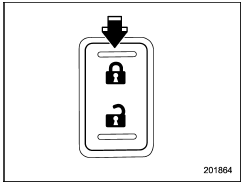
6. Press the front side ("LOCK" side) of the power door locking switch to set the door locks.
7. Close the door. An electronic chirp will sound once, the hazard warning flashers will flash once and the security indicator light will start flashing rapidly. After rapid flashing for 30 seconds (standby time), the indicator lights will then flash slowly (twice approximately every 2 seconds), indicating that the system has been armed for surveillance.
 To arm the system using access
key/remote transmitter
To arm the system using access
key/remote transmitter
1. Close all windows and the moonroof (if
equipped).
2. Remove the key from the ignition
switch (models without "keyless access
with push-button start system")/turn the
push-button ignition swi ...
 To arm the system using the keyless access function (if equipped)
1. Close all windows and the moonroof (if
equipped)
2. Turn the push-button ignition switch to
the "OFF" position.
3. Open the doors and get out of the
vehicle.
4. Make sure that the engine ...
Other materials:
Dtc c2121 transmitter 1 no data
TIRE PRESSURE MONITORING SYSTEM (DIAGNOSTICS) > Diagnostic Procedure with Diagnostic Trouble Code (DTC)DTC C2121 TRANSMITTER 1 NO DATANOTE:Refer to DTC C2124 for diagnostic procedure. Diagnostic Procedure with Diagnostic Trouble Code (DTC) > DTC C2124 TRANSMITTER 4 NO DATA"> ...
Installation
REAR SUSPENSION > Rear StabilizerINSTALLATIONCAUTION:• Be sure to use a new flange nut and self-locking nut.• Always tighten the bushing in the state where the vehicle is at curb weight and the wheels are in full contact with the ground.• Install the clamp - stabilizer bushing w ...
Removal
VEHICLE DYNAMICS CONTROL (VDC) > Front ABS Wheel Speed SensorREMOVAL1. Disconnect the ground cable from battery. NOTE">2. Lift up the vehicle, and then remove the front wheels.3. Remove the front ABS wheel speed sensor.CAUTION:• Be careful not to damage the sensor.• Do not ap ...
