
Subaru Crosstrek Owners Manual: Tire rotation
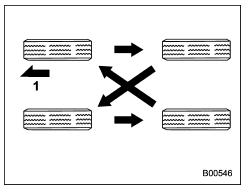
Vehicles equipped with 4 non-unidirectional tires
- Front
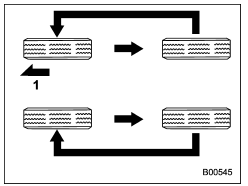
Vehicles equipped with unidirectional tires
- Front
Tire wear varies from wheel to wheel.
Move the tires to the positions shown in the illustration each time they are rotated.
For the tire rotation schedule, refer to the "Warranty and Maintenance Booklet".
Replace any damaged or unevenly worn tires at the time of rotation. After tire rotation, adjust the tires pressures and make sure the wheel nuts are correctly tightened.
After driving approximately 600 miles (1,000 km), check the wheel nuts again and retighten any nut that has become loose.
 Tire rotation direction mark
Example of tire rotation direction mark
Front
If the tire has the rotation direction
specification, the tire rotation direction
mark is placed on its sidewall.
When you install a tire ...
 Tire replacement
The wheels and tires are important and
integral parts of your vehicle's design;
they cannot be changed arbitrarily. The
tires fitted as standard equipment are
optimally matched to the characterist ...
Other materials:
Preparation tool
CONTINUOUSLY VARIABLE TRANSMISSION (DIAGNOSTICS) > General DescriptionPREPARATION TOOL1. SPECIAL TOOLILLUSTRATIONTOOL NUMBERDESCRIPTIONREMARKS — SUBARU SELECT MONITOR 4Used for setting of each function and troubleshooting for electrical system.NOTE:For detailed operation procedures of Subaru Se ...
Dtc c1541 clutch switch off malfunction
VEHICLE DYNAMICS CONTROL (VDC) (DIAGNOSTICS) > Diagnostic Procedure with Diagnostic Trouble Code (DTC)DTC C1541 CLUTCH SWITCH OFF MALFUNCTIONNOTE:For the diagnostic procedure, refer to “DTC C1542 CLUTCH SWITCH ON MALFUNCTION”. Diagnostic Procedure with Diagnostic Trouble Code (DTC) & ...
Dtc b28b5 +b circuit open
EyeSight (DIAGNOSTICS) > Diagnostic Procedure with Diagnostic Trouble Code (DTC)DTC B28B5 +B CIRCUIT OPENDetected when there is an open circuit in power supply line.NOTE:Refer to DTC B2814 for diagnostic procedure. Diagnostic Procedure with Diagnostic Trouble Code (DTC) > DTC B2814 POWER SUPP ...
